Monday, July 30, 2007

Quick WPF tip: Alternative text for images

In HTML we have Alt tag, that provides alternative text for images (in case, that image is not exists), but what to do in XAML? Simple, use the power of DataTemplates and DataTriggers. In following example, I have data item with following properties Logo, which is Bitmap, Name and Description, that strings. I want to display Name text, in case, I have or want to disable no logo bitmap. Following code.


<DataTemplate x:Key="tmpProvider">

<
Grid>

<
TextBlock TextBlock.FontWeight="Bold" Text="{Binding Path=Name}" Visibility="Collapsed" Name="AltText"/>

<
Image Stretch="UniformToFill" Source="{Binding Path=Logo}" Name="Image" TextSearch.Text="{Binding Path=Name, Mode=OneWay}"/>

<
Grid.ToolTip>

<
StackPanel>

<
TextBlock Text="{Binding Path=Name}"/>

<
TextBlock Text="{Binding Path=Description}"/>

</
StackPanel>

</
Grid.ToolTip>

</
Grid>

<
DataTemplate.Triggers>

<
DataTrigger Binding="{Binding Path=Logo}" Value="{x:Null}">

<
Setter TargetName="AltText" Property="Visibility" Value="Visible"/>

</
DataTrigger>

</
DataTemplate.Triggers>

</
DataTemplate></PRE< P>


Simple, isn't it? Thank all, those where 10 seconds about another accessibility pattern in WPF

Saturday, July 28, 2007

Microsoft Expression Blend 2 August Preview is available

New refreshment of great XAML editing tool is available for download as Preview version. What's new? Silverlight (working with Silverlight 1.0 RC) and Visual Studio 2008 (Orcas) integration support, User controls authoring, XAML editor got some improvements, such as changing font sizes, word wrapping, etc. You can now target your build by using $(BuildingExpressionBlend) property. New storyboard picker replaces old Storyboard combobox and you can finally manipulate (scaling, resizing, etc) multiple objects.

We're looking forward for your feedbacks

Download Microsoft Expression Blend 2 August Preview

Friday, July 27, 2007

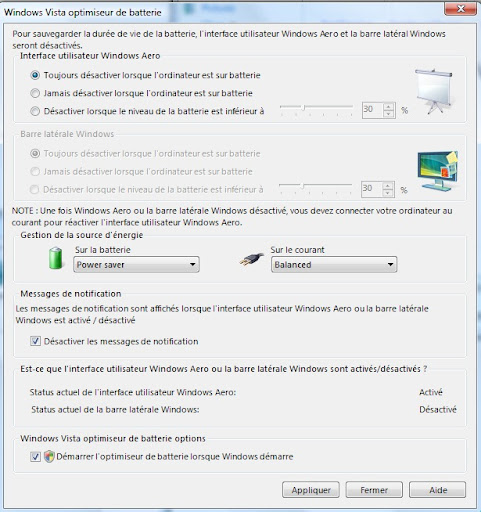
Vista Battery Saver - French version

Now you can get latest beta 2 of Vista Battery Saver in French. Great thanks to Vista french community (VistaRC) for this contribution.

If you want to use Vista Battery Saver in french, just download VistaBatterySaverSetup-MUI.msi from current release location and if your locale is FR, you'll get french UI for this application

image

Thursday, July 26, 2007

Microsoft is going Open Source

Oh, my godness... Microsoft implements O'Relly OSCON. This must be really fun, how far may it take...
Open Source software labs @ Microsoft, CodePlex (it's only because of Vista Power Saver, indeed), Microsoft Shared Source, Open Source ISV Forum... Sounds really fun, can we have the sources of the next Windows version? See yourself: http://www.microsoft.com/opensource/

clip_image001

WPF Events and memory leaks

Today, we'll speak about RoutedEvent and possible memory leaks associated with them. If you ever use EventManager, that's really cool mechanism of external attached event handling, you'll notice about lack of ability to unsubscribe from event handlers. What to do? Is it bad design? Actually, yes. This is possible memory leak. So, what to do with it?

First of all, you can try to null handler.


if(em_handler == null)

em_handler =
new RoutedEventHandler(EM_HandlePreviewMouse);

EventManager.RegisterClassHandler(typeof(Button), TextBlock.PreviewMouseDownEvent, em_handler);


... 

em_handler =

null


This will not work. Actually, the reference remains, event if handler is nulled. So, what can we do? We can use attached events. As well as we are able to attach to external event, we can unattach from it


if(re_handler == null)

re_handler =
new RoutedEventHandler(RE_HandlePreviewMouse);

this.AddHandler(Button.PreviewMouseDownEvent, re_handler);


... 

this.RemoveHandler(Button.PreviewMouseDownEvent, re_handler)


So, this can give us possible solution, but what to do with really large objects? Unattaching from events will net destroy references to them. Actually, even in .NET 2.0 and 1.1, when we're using -= operator, we are not disposing handlers, we only disconnect from it.


In WPF where is new cool class, named WeakEventManager and it's implementation IWeakEventListener. But how to use them in our case? For real it's rather simple. Create new object, derrived from WeakEventManager for class you want to handle events. Just like this


public class WeakButtonEventManager:WeakEventManager

{

protected override void StartListening(object source)

{


Button b = source as Button;

if (b != null)

{


b.PreviewMouseDown +=
new MouseButtonEventHandler(OnPreviewMouseDown);

}


}


protected override void StopListening(object source)

{


Button b = source as Button;

if (b != null)

{


b.PreviewMouseDown -=
new MouseButtonEventHandler(OnPreviewMouseDown);

}


}


void OnPreviewMouseDown(object sender, MouseButtonEventArgs e)

{


DeliverEvent(sender, e);


}


public static void AddListener(Button source, IWeakEventListener listener)

{


Manager.ProtectedAddListener(source, listener);


}


public static void RemoveListener(Button source, IWeakEventListener listener)

{


Manager.ProtectedRemoveListener(source, listener);


}


static WeakButtonEventManager Manager

{


get

{

Type t = typeof(WeakButtonEventManager);

WeakButtonEventManager m = WeakEventManager.GetCurrentManager(t) as WeakButtonEventManager;

if (m == null)

{


m =
new WeakButtonEventManager();

WeakEventManager.SetCurrentManager(t, m);

}


return m;

}


}


}</PRE< P>


Then, create it's weak event implementation


public class ExpensiveButton : DispatcherObject, IWeakEventListener

{

Button b;

public event MouseButtonEventHandler PreviewMouseDown;


public ExpensiveButton(Button source, bool isReallyExpensive)

{


b = source;


if(isReallyExpensive)

WeakButtonEventManager.AddListener(b, this);

else

b.PreviewMouseDown += new MouseButtonEventHandler(OnPreviewMouseDown);

}


~ExpensiveButton()


{


this.Dispatcher.BeginInvoke(DispatcherPriority.Normal, (SendOrPostCallback)delegate

{

//Clean up all resources


WeakButtonEventManager.RemoveListener(b, this);

b.PreviewMouseDown -=
new MouseButtonEventHandler(OnPreviewMouseDown);

},
null);

}


void OnPreviewMouseDown(object sender, MouseButtonEventArgs e)

{


if (PreviewMouseDown != null)

PreviewMouseDown(sender, e);


}


#region IWeakEventListener Members


public bool ReceiveWeakEvent(Type managerType, object sender, EventArgs e)

{


if(managerType == typeof(WeakButtonEventManager))

{


OnPreviewMouseDown(sender, e
as MouseButtonEventArgs);

return true;

}


return false;

}


#endregion

}</PRE< P>


Now, you can easily handle and unhandle this class event, by disposing the event itself, rather then leave it in stack.


ex_button = new ExpensiveButton(butt, true);

ex_button.PreviewMouseDown +=
new MouseButtonEventHandler(EX_HandleMouseDown);


.... 

ex_button.PreviewMouseDown -=

new MouseButtonEventHandler(EX_HandleMouseDown)


Happy programming


Source code for this article

Tuesday, July 24, 2007

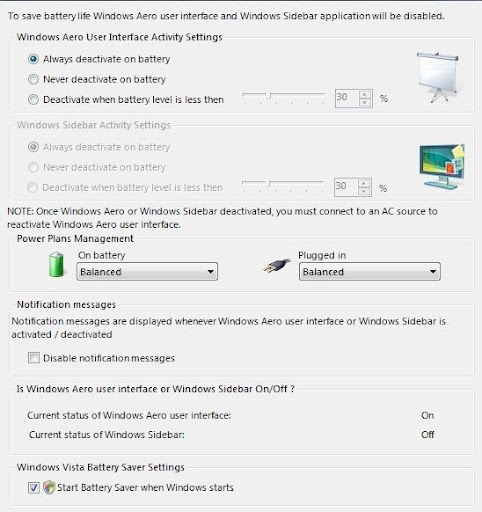
Vista Battery Saver Beta 2 is available for download

New version of Vista Battery Saver (beta 2) is available for download from CodePlex. Except bug fixes, there is a new feature - automatic power plan change, depends on power source you are working with. I'm really wondering,  why this feature is not available in Windows Vista out-of-the-box? For example, if you are working on battery, you'd want to use Power Saver plan, however, if you are working on AC, you'd rather use Balanced or High Performance. So, Vista Battery Saver does it for you now. All you have to do is to run it and configure plan you want to use on battery and on AC.

bbb1

In this version, I completely rewrite power aware routines, and now it's using only direct system API call, this way, I get rid over expensive timers. So, download it, use it and notice report all bugs discovered on CodePlex issues tracker and in comments.

Thank you. Remember, It still do not run itself after the installation. You should look into Start->Accessories menu to find and run it.

Download Vista Battery Saver Public Beta 2

Sunday, July 22, 2007

Hack read only properties and fields using reflection

Today I got really confusing question: "Is it possible to change readonly property?". The first question, I asked is: "Why to do it?". The next thought was: "This is dammed interesting, whether is possible". Let's see...

One thing is sure - we can not do it regular way, but we can do it for sure by using reflection. Let's create the class itself

class TestReadOnly  { 

public readonly int ReadOnlyField = 10;

readonly int m_readOnlyProperty = 20;

public int ReadOnlyProperty { get { return m_readOnlyProperty; } } }


Now, let's see what values we have


TestReadOnly tro1 = new TestReadOnly(); 

Console.WriteLine("Field value: {0}, Property value: {1}",tro1.ReadOnlyField, tro1.ReadOnlyProperty);


Well, the results are as expected: 10 and 20. The next step is to change them from external class. Is it possible? Yes, it is. The magic word is "reflection". We'll read the read only field by using reflection


Type t = typeof(TestReadOnly); 

FieldInfo fi = t.GetField("ReadOnlyField");


Now, we'll just set its value.


fi.SetValue(tro1, 50);


Well, well, well. It works. Just works. You can change field value by using reflection, even if the field is read only (actually, it is not a lot of sense to du such thing).


Now, the next step of our challenge. Change the read only property. This might be tricky, 'cos actually, there is no setter at all in IL level. Let's try


PropertyInfo pi = t.GetProperty("ReadOnlyProperty"); 

Object[] arg = new Object[0];

pi.SetValue(tro1, 60, args);


Too bad, we caught ArgumentException. It's clear, 'cos there are actually no code we can execute this way. But, if we'll look into Reflector, we can find the private read only field and set it as we did in our previous example.


PropertyInfo pi = t.GetProperty("ReadOnlyProperty"); 

Object[] arg = new Object[0];

try { pi.SetValue(tro1, 60, args); }

catch (ArgumentException e) {

FieldInfo
fi1 = t.GetField("m_readOnlyProperty",

BindingFlags.Instance | BindingFlags.NonPublic);

fi1.SetValue(tro1, 60);


}


Now it works. Cool, we changed read only property of managed object. And what's about unmanaged code? Let's try to do the same thing with Outlook Appointment.


To access System.__ComObject (the real object in underlying model), we can not use regular GetMember method (due to the fact, that, actually, there are no managed methods there). But, we can invoke methods (note, that property getters and setters are actually methods ued to set values). How to do it? Simple. First of all, let's create boring outlook stuff


Microsoft.Office.Interop.Outlook.Application applicationObject = new Microsoft.Office.Interop.Outlook.ApplicationClass(); 

Microsoft.Office.Interop.Outlook.
MAPIFolder calendarFolder = applicationObject.Session.GetDefaultFolder(Microsoft.Office.Interop.Outlook.OlDefaultFolders.olFolderCalendar);

Microsoft.Office.Interop.Outlook.
Items appointments = calendarFolder.Items;


Now, let's iterate appointments to get it's underlying objects. For each appointment we'll get read only LastModificationTime property


Microsoft.Office.Interop.Outlook.AppointmentItem appointment = (Microsoft.Office.Interop.Outlook.AppointmentItem)item; 


Console.WriteLine("COM Field: {0}", appointment.LastModificationTime);

//appointment.LastModificationTime is read only


Now, let's invoke it's setter (that, actually does not exists)


appointment.GetType().InvokeMember("LastModificationTime", 

BindingFlags.Default | BindingFlags.SetProperty, null,

appointment,
new object[]

{
DateTime.Now });


As expected, we got an exception. But this time, it's TargetInvokationException (we invoke it, remember). What to do? Not a lot. Look and seek OLEViewer to figure where set_LastModificationTime occurs and invoke it with new params. I have neither time, nor wish to do it, but you can. See the very beginning of this post. We should figure what actually happens in order to be able to change it. With unmanaged code it's much harder, that with managed. But it's possible.


Have a nice day.


Ah, don't you forgot to release all this stuff?


finally  { 

Console.WriteLine("COM Field: {0}", appointment.LastModificationTime);

//time to cleanup

Marshal.ReleaseComObject(appointment); }

//Just stop it from propagating

break; }

Marshal.ReleaseComObject(item); }

Marshal.ReleaseComObject(appointments);

Marshal.ReleaseComObject(calendarFolder);

Marshal.ReleaseComObject(applicationObject);


:) Good programming.