Preston Gralla from PCWorld US marked Vista Battery Saver as one of 20 best applications for Windows Vista. Respect...
Wednesday, September 26, 2007


Tuesday, September 25, 2007
WPF Performance Labs
Ok, second day of WPF adaptation labs with SAP at Redmond. We met some of core WPF developers, such as Bea Costa, Dwayne Need, Atanas Koralski, William Han and counting. It's great opportunity to speak and ask owners of what we are working with. If you have performance oriented questions in WPF, next two days is the time to ask them. So, what are you waiting for? Use comments!
Tuesday, September 18, 2007
How to invoke client side JavaScript from Silverlight object
Yesterday, I got a question from one of my clients' about how invoke javascript on client side HTML page from inside Silverlight object. It's easy to access hosting HTML document DOM model from Silverlight, as well as you can access text of Javascript there, but you can not invoke it. The only way is to interpret it and then do something with it. No way - I told, and begun to investigate the field.
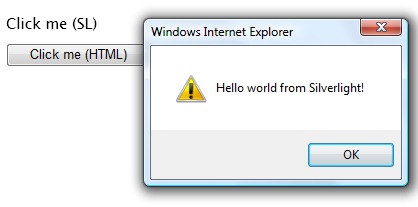
The first thing, I found is an ability to expose Silverlight objects to HTML hosting document, by using Scriptable attribute. So, Let's mark our SL canvas and enable access to it
[Scriptable]

 public partial class Page : Canvas
Next, handy WebApplication class enables me to register Silverlight handlers and access them from HTML page
public Page()

 : base()

 {


 WebApplication.Current.RegisterScriptableObject("Handler", this);

 }
Now, I can create handler inside Silverlight application and call it there (don't forget to mark it scriptable)
[Scriptable]

 public event EventHandler<CallbackEventArgs> Callback;


 void click(object s, MouseEventArgs e)

 {


 if (Callback != null)

 {


 CallbackEventArgs args = new CallbackEventArgs("Silverlight");

 Callback(this, args);

 }


 }
Now arguments. Let's do something simple and generic
[Scriptable]

 public class CallbackEventArgs : EventArgs

 {

 object _bag;

 [Scriptable]

 public object DataBag { get { return _bag; } set { _bag = value; } }


 public CallbackEventArgs(object bag)

 {


 DataBag = bag;


 }


 public override string ToString()

 {


 return DataBag.ToString();

 }


 }
We are finished at silverlight side. Now HTML turn. Go into your TestPage.html.js and subscribe to OnLoad event (you can not do it in constructor, due to fact, that SL object does not exist in this point)
function createSilverlight()

{


Silverlight.createObjectEx({


source: "Page.xaml",

parentElement: document.getElementById("SilverlightControlHost"),

id: "SilverlightControl",

properties: {


width: "100%",

height: "100%",

version: "1.1",

enableHtmlAccess: "true"

},

events: {


 onLoad: OnLoad


 }


});


function OnLoad(sender, args)

 {


 sender.Content.Handler.Callback = function(sender, arg) { foo(arg); }

 }
Pay attention of the way, I'm accessing scriptable objects, exposed by Silverlight.
Well, we, actually, finished. Our foo(string) method will be called.
 <script type="text/javascript">

 function foo(val)

 {


 alert("Hello world from "+val+"!");

 }


 </script>

</head>


<body>

 <div id="SilverlightControlHost" class="silverlightHost" >

 <script type="text/javascript">

 createSilverlight();

 </script>

 </div>

 <button onclick="foo('JS');" >Click me (HTML)</button>

</body>
Hello JS world from inside Silverlight.
Monday, September 17, 2007
Drag and Drop between Silverlight and HTML + Placing HTML control into Silverlight page
Silverlight is great new technology. It makes us possible to get access to almost all hosting HTML, including it's scripts, and behaviors. Today, we'll speak about how to create Drag-n-Drop between HTML page and Silverlight control. Here the result
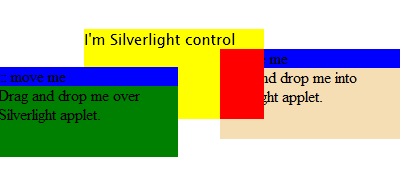
So, let's start. First of all we have to create Silverlight control. Next, two HTML div elements with regular HTML Drag-and-drop capabilities. You can find a lot of such scripts in internet. I used my own. Then connect everything and run. You'll be able to drag the HTML control over your page, but when you'll approach into Silverlight activeX, you'll feel your mouse to slow response and the HTML control will be under Silverlight one, even if it's z-order will be much higher. What's the problem? The answer is simple - Silverlight bubbles mouse event to HTML page thus while you moving your mouse over SL, the response time will be decreased and z-index will be lowest. To get rid of it, you have to put a single property in Silverlight host Javascript, that will make you able to manage z-order of the SL control as you do it for all other HTML controls. Take a look into createSilverlight JS function inside TestPage.html.js. You'll notice following script
function createSilverlight()

{


Silverlight.createObjectEx({


source: "Page.xaml",

parentElement: document.getElementById("SilverlightControlHost"),

id: "SilverlightControl",

properties: {


width: "100%",

height: "100%",

version: "1.1",

enableHtmlAccess: "true"


},

events: {}


});


// Give the keyboard focus to the Silverlight control by default

 document.body.onload = function() {

 var silverlightControl = document.getElementById('SilverlightControl');

 if (silverlightControl)

 silverlightControl.focus();


 }


}
Now put isWindowless: "true" under enableHtmlAccess property (don't forget comma before). Now you are able to put any HTML element over Silverlight control and all events will come first into HTML page, and then into SL control.
Next step is to notify Silverlight about approaching HTML control. How to do it? The answer is attaching to the hosting page event and measurements. Get document and attach to it's onmousemove event.
InitializeComponent();


 d = HtmlPage.Document;

 d.AttachEvent("onmousemove", docMouseMove);
Now, get the absolute position of Silverlight control in your HTML page
el = d.GetElementByID("HTMLControlHost");

 HtmlElement host = d.GetElementByID("SilverlightControlHost");

 string x = host.GetStyleAttribute("left") ?? "0";

 string y = host.GetStyleAttribute("top") ?? "0";

 position = new Point(int.Parse(x.ToLower().Replace("px", string.Empty)), int.Parse(y.ToLower().Replace("px", string.Empty)));
And now, hide adorner, you'll use to move HTML element inside Silverlight
c = (Canvas)this.FindName("canv");

 c.SetValue<double>(Canvas.LeftProperty, this.Width);

 c.SetValue<double>(Canvas.TopProperty, this.Height);
Well done. The only thing remains is to handle mousemove event and after checking of moved element position and light calculations, translate it position to the position of your adorner.
void docMouseMove(object s, HtmlEventArgs e)

 {


 string sx = (el.GetStyleAttribute("left") ?? "0").ToLower().Replace("px", string.Empty);

 string sy = (el.GetStyleAttribute("top") ?? "0").ToLower().Replace("px", string.Empty);


 int x = int.Parse(sx);

 int y = int.Parse(sy);


 if ((x) < position.X + this.Width && y < position.Y + this.Height)

 {


 c.SetValue<double>(Canvas.LeftProperty, x - position.X);

 c.SetValue<double>(Canvas.TopProperty, y - position.Y);

 }


 else

 {

 c.SetValue<double>(Canvas.LeftProperty, this.Width);

 c.SetValue<double>(Canvas.TopProperty, this.Height);

 }


 }
We done. Now you can handle Drag And Drop HTML elements into or over Silverlight controls. This way, you can even drag Silverlight controls out to HTML page (this is regular DIV element after all)
Saturday, September 15, 2007
Blend 2 September preview is available for download
Good present for Ramadan, new refreshment of Blend 2 - September preview is up and ready for your downloads. New features:
- VS2008 beta 2 full support
- Creation of Controls from existing objects - reuse them all.
- Some enhancements with Split View - now you can see Design and Code both as well as you can do it in Visual Studio
- Storyboard picker - the old Storyboard panel has been thrown and replaced with brand new storyboard picker. Now you can duplicate, reverse or delete existing storyboard or easy modify its properties.
- Aside with new storyboard picker, now you have properties panel both for all sotryboard or single frame.
- New functionality - 3D Vertex animation
- Long awaited Breadcrumb bar
- Subsetting and embedding fonts within your application (EULA awarded)
- New build options - how you can create custom builds for better integration with Visual Studio
- New abilities of object manipulation - uniformly resize, scale, rotate multiple objects, resizing handlers at artboard. Easy object duplication by dragging with Ctrl-P pressed.
Great work! Full list of changes, screenshots and video demos are here. Download page is here.
Have a nice week... As for me, Jewish New Year begun with someone who burglarized my car and stole my wallet. Now I'm without ID, credit cards and all my international SIMs, but I'll be fine (I believe so...)
Tuesday, September 11, 2007
Find similar images on your computer with Duplicate Images Finder
I wrote a lot of image (and not only image) processing algorithms. Most of them were for military proposes. Almost all of them are not secret, so why not to use war technologies for peace manners? Sitting one of those long evenings, I wrote a simple application, that seeks for similar (not by name of cause) images in your hard disk and make you able to delete them. I will not explain the search algorithm here, but post the application for free download. Try it, use it and tell me what you think about.

Following examples of images found by this application.



The algorithm used is not optimized for such operations, thus it takes about one minute to find first duplicate in directory of 200 images 2048X1536. Final result comes after about three minutes.
Maybe in the future, I'll optimize those algorithms for everyday use. It depends only on you, my readers, wish to tell me about how the application is.
To use: Run application, browser for start directory or drop directory from windows explorer and hit Search. After results will arrive, select original image from the left and duplicate from the bottom. If you wish to delete one or both of them, hit red cross under each one of those images. Happy use. Don't forget to tell me how it was.
Download Duplicate Image Finder>> (200k, no installation required)
Sunday, September 09, 2007
How to use ImageSource (no handler) in WinForms as System.Drawing.Bitmap (hbitmap)
How to easily convert WinForms System.Drawing.Bitmap into WPF ImageSource you learned from this article. Today, I'll explain how to do it contrary. Actually, all he have to do is to extract handler from BitmapSource, however, such approach is not supported, thus the only thing we can do is just copy pixels of BitmapSource (or BitmapFrame) into byte array and then copy them into the pointer of HBitmap. Here the code
public static System.Drawing.Bitmap BitmapSourceToBitmap(BitmapSource srs)

 {


 System.Drawing.Bitmap btm = null;

 int width = srs.PixelWidth;

 int height = srs.PixelHeight;

 int stride = width * ((srs.Format.BitsPerPixel + 7) / 8);


 byte[] bits = new byte[height * stride];


 srs.CopyPixels(bits, stride, 0);


 unsafe

 {

 fixed (byte* pB = bits)

 {


 IntPtr ptr = new IntPtr(pB);


 btm = new System.Drawing.Bitmap(

 width,


 height,


 stride,


 System.Drawing.Imaging.PixelFormat.Format32bppPArgb,

 ptr);


 }


 }


 return btm;

 }
Not so straight forward, but it works.
Subscribe to:
Posts (Atom)