Monday, May 05, 2008

Performance appliance of RenderTargetBitmap

Challenge: draw complicated Path and animate anything over it
Problem: high CPU while animating object
So, we got another challenge – draw Path object with thousand of points and animate another object over the Path by having least possible impact on CPU. What’s the problem?

First of all, let’s create out XAML

<Path Name="path" Stroke="Black" StrokeThickness="1" Data="{x:Static l:Window1.Data}"/>   

and generate graphics geometry for it

public static Geometry Data
        {
            get
            {
                for (int i = 0; i < 1024; i++)
                {
                    pts.Add(new Point((double)rnd.Next(2000), (double)rnd.Next(2000)));
                }

                StreamGeometry geometry = new StreamGeometry();
                geometry.FillRule = FillRule.EvenOdd;
                using (StreamGeometryContext ctx = geometry.Open())
                {
                    ctx.BeginFigure(new Point(0, 0), false, false);
                    ctx.PolyLineTo(pts, true, true);
                }
                return (Geometry)geometry.GetAsFrozen();
            }
        }

Next, let’s create simple rectangle and animate TranslateTransform object, relays in RenderTransform collection

redRect.Width = 100;
            redRect.Height = 100;
            redRect.Fill = Brushes.Red;
            redRect.HorizontalAlignment = HorizontalAlignment.Left;
            redRect.RenderTransform = trans;

root.Children.Add(redRect);
            DoubleAnimation da = new DoubleAnimation(0, this.ActualWidth, new Duration(TimeSpan.FromSeconds(10)));
            da.Completed += (EventHandler) delegate {root.Children.Remove(redRect);};
            trans.BeginAnimation(TranslateTransform.XProperty, da);

Animating RenderTransform collection is the most efficient way to change things in WPF visual tree. It does not tickles the tree, does not performs layout and rendering engine is very smart to update only dirty regions. 

See yourself (dirty regions update is colored)

image

Very well. Let’s see CPU rate – 60%? WTF? Why? I’m using most performant RenderTransform, transforming only necessary things and doing it over static object. Static? Well, it’s retained object, so WPF trying to redraw each region under the moving object. What to do?

We can try to use Adorners. It might help us to avoid underlying object redraw.

So, we’ll create our own Adorner, that knows to hold UIElement inside it

class CanvasAdorner : Adorner
        {
            UIElement parent,child;
            List<UIElement> children;
            public CanvasAdorner(UIElement adornedElement, UIElement Child)
                : base(adornedElement)
            {
                children = new List<UIElement>();
                parent = adornedElement;
                Add(Child);
            }

Then we’ll create adorner layer from our root panel and animate rectangle inside it.

AdornerLayer layer = AdornerLayer.GetAdornerLayer(root);
            CanvasAdorner ca = new CanvasAdorner(root, redRect);
            layer.Add(ca);
            DoubleAnimation da = new DoubleAnimation(0, this.ActualWidth, new Duration(TimeSpan.FromSeconds(10)));
            da.Completed += (EventHandler)delegate { layer.Remove(ca); ca.Remove(redRect); };
            trans.BeginAnimation(TranslateTransform.XProperty, da);

We should see performance boost? No, we’re not. This is because of rendering engine, that draws everything together

image

It still works very hard to redraw each pixel in geometry.

What to do? We can either create new DirectX surface and draw over it or, maybe another rendering (or UI) thread? Net very simple solution. I prefer “GDI+ way”.

What is it? Don’t you remember, old good way, when we pin pixels in bitmap in order to make visual cache? We can do it in WPF too. To do it, we’ll use RenderTargetBitmap object. This object knows convert WPF Visual into Bitmap and this is exactly what we need.

So we’ll create Image and it source will be our Visual, rendered by RenderTargetBitmap (this is software accelerated!)

RenderTargetBitmap rtb = new RenderTargetBitmap((int)path.ActualWidth, (int)path.ActualHeight, 96, 96, PixelFormats.Pbgra32);
            rtb.Render(path);
            rtb.Freeze();
            root.Children.Remove(path);
            Image img = new Image();
            img.Stretch = Stretch.None;
            img.Source = rtb;
            root.Children.Insert(0,img);

Now we can move and animate our rectangle over bitmap. It still works and renders only necessary regions (BTW, pay attention, that those regions much smaller, thus animation performance is much better), but what’s happened with CPU?

image

It’s around 2% – we reach the goal. But why his happens? What the difference between rendering Path and Bitmap? After all both pixels – yes, but in Bitmap case those pixels are not retained, thus rendering thread almost does not work. See the CPU comparison for three of those methods
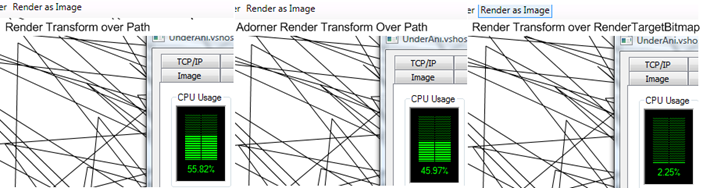
 image

Don’t it really cool? There are some problems with this method – one of those problem (and most serious) is that creation of RenderTargetBitmap and it’s rendering takes a lot of time and CPU (in my case it was about 0.5 seconds) another problem, that we’re playing with Visual and Logical tree, so we’re rerender and layout whole application window twice – before and after creation. However even with those problems this way is the best to get performant animation over retained WPF objects.

Have a nice day and be good people. Source code for this article.

Friday, May 02, 2008

Stand alone multiplatform Silverlight application

Recently we spoke about running Silverlight application as client side only stand alone application. I used WebBrowser, MSHTA and Silverlight OCX with a little bit interop to make it running. In comments, Laurent Bugnion show me his method, that was pretty similar to mine, except the fact, that he used managed code to access file system. But more interesting comment come from Christophe Lauer, who tried to run Silverlight as completely stand alone application, by using Cassini embedded  into windows application, that actually represents web server for Silverlight hosting.

Inspired by this idea, I decided to implement my own small web server suitable to Silverlight hosting and embed it into my application. Then, compile and run it on Linux. That’s the result – It’s working!

image

How to do this? Simple – we have a lot of handy classes in C# in order to make small web server, that only knows to dispatch static files with appropriate mime types. Here we go. First of all, we’ll create simple WinForms application, that has WebBrowser inside it. Then we’ll use TcpListener to create our server socket and give it’s local address to embedded web browser, that will create requests.

listener = new TcpListener(IPAddress.Any, port);
listener.Start();
BeginGetReponse(null);
webBrowser1.Url = new Uri(string.Format("http://localhost:{0}",port));

Now, we should start listening and one got request, response it

void BeginGetReponse(IAsyncResult ar)
       {
           try
           {
               if (ar == null)
               {
                   listener.BeginAcceptSocket(BeginGetReponse, null);
                   return;
               }
               Socket socket = listener.EndAcceptSocket(ar);
               if (socket.Connected)
               {
                   byte[] inbuffer =  new byte[1024];
                   int br = socket.Receive(inbuffer);
                   string req = Encoding.ASCII.GetString(inbuffer, 0, br);

How could we know what file to dispatch? See http header of cause. (Note – this is ugly, quick and dirty solution only for POC)

string s = req.Split(' ')[1];
                    string send = string.Empty;
                    string mime = "text/html";

                    if (s == "/")
                    {
                        send = Resources.Default;
                    }
                    else if (s == "/Page.xaml")
                    {
                        send = Resources.Page;
                        mime = "application/xaml+xml";
                    }

How we have to create the same header our self and response with content

const string httpHeader = "HTTP/1.1 200 OK\r\nServer: WeirdThing1.1\r\nContent-Type: {0}\r\nAccept-Ranges: bytes\r\nContent-Length: {1}\r\nConnection: Close\r\n\r\n{2}";

byte[] data = Encoding.ASCII.GetBytes(send);
byte[] resp = Encoding.ASCII.GetBytes(string.Format(httpHeader, mime, data.Length, send));
br = socket.Send(resp);

We done. Now it works in Windows, but will it work in Linux? Let’s see…

First of all we have to add libgluezilla package to be able to use WebBrowser in mono. This is Gecko engine, that clues base browser core into Winforms. Very cool. That’s all we need. Right now we can just run our application “as-is” by using mono prompt and it will work.

The only small problem, that Moonlight plugin does not know, that it can run on Gecko (it is not FireFox). But small woodoo with it’s sources solves the problem. And now we can either continue to run it as it (with mono prompt) or compile it by using NAnt to work natively.

From here, as you, probably understand, the sky is the limit – create 1 socket by using C++ and run it whenever Silverlight can run. Also, you can even use Windows 2008 core (it has small IIS inside) to run it.

Have a nice day and be good people. Source code for this article.

Wednesday, April 30, 2008

It’s broken

Hi, everybody. First of all, I want to apologize for the inconvenience, caused by me to all bloggers in blogs.microsoft.co.il. The reason is, that one of my posts got slashdoted. This night our server, hosted in orcweb received month amount of visitors within couple of hours. This cause some problems, that even load balancing farm was unable to leverage. Currently you can experience problems with rss feeds, the site access and other side effects. To be sure, the right RSS url is “http://feeds.feedburner.com/microsft” Just put in into your rss reader and it will work very soon, right after all technical problems will be solved. Also, my personal web site, that hosts some content in this blog was temporary closed because of extreme traffic excitation, thus neither of Silverlight and SVG examples will work. Sorry again and thank you for understanding.

Tamir

image

Monday, April 28, 2008

Computer languages and facial hair – take two

About four years ago, I wrote an article about relationship between facial hair and computer languages success (this is cached page, the original article has been lost). Today, I want to recall this article and see what happened with my theory.

Let’s start from Fortran, Ada and Simula. Fortran inventor, John Backus, died in Oregon last year. Ada inventor, Jean Ichbiah died three months earlier from brain cancer in Paris. Kristen Nygaard, the father of Simula, died of a heart attack. Let’s pause to remember those giants.

image  image image

What’s about F#? His inventor, Dr. Don Syme has neither beard, nor moustaches. Thus it looks like there is no real future expected to this language

image

What happens with Prolog inventor, Alain Colmerauer? He still has no beard. This means, that the great future is not expected to Prolog as well.

image

Let’s see what’s going on with C? Brian W. Kernighan, Dennis M. Ritchie and Kenneth L. Thompson. They are fine. Still have very good bears, so C has long long life. Currently this computer language is used in 16% of open source projects (according SourceForge)

image image image

Next in row – Smalltalk aka Alan Curtis Kay. He has moustaches today, but no one really using Smalltalk. What’s the problem? He’s Flex concept got small bust those days. But all problems around Flex concept are stopping it from being very popular in real life.

image 

Objective - C – Brad Cox. It does not look like he has at least moustaches those days. Even his Java+ concept faded in past

image

C++ still about 18% of industry, however it seemed like C++ just disappears from from computer horizons. Let’s try to understand why. Just compare Bjarne Stroustrup’s facial hair at the beginning of C++ gold era

 image

A couple of years ago

image

And those days

image

Don’t you see the real degradation of his beard and moustaches? Bjarne, throw your shaver out of window and fast to save C++!

Now let’s see what’s going on with Thomas E. Kurtz, the inventor of Basic. When he has those moustaches BASIC was the language of simple yet not very effective programming

image

However, today this light weigh language losing it’s popularity (less then 2% of the industry). This why:

image

What’s about Perl, that still holding more, than 6% of industry? Larry Wall, keep those grand moustaches!

image

Now my favorite – Ruby and Python. Last year two those languages become super popular in web environment. Has anything changed in their inventors facial hair? Both Van Rossum (Python) and Yukihiro Matsumoto (Python) got beards. BTW, Matz did it because of my article (see comments). Keep doing!

image image

But what’s going on with C# and Java? Anders Hejlsberg still has neither beard, nor moustache, thus it’s after four years, the industry share of C# is around 4%, while James Gosling’s beard got better within 18% of open source projects

image image

What’s next? There are some new languages in horizon. There are no really new, but there are new concepts, like RubyCLR with Sam Ramji, that looks like has small chances to be really popular

image

As well as Scott Guthrie with WPF and Silverlight (well it’s not really him, but other architects in Microsoft are not much hairy)

 image

JSON (aka JSLint) with Douglas Crockford has very good chances. Keep doing, Douglas.

image

When IronPython (and other DLR-based languages) are hard to see see good chances for Jim Hugunin

image

Let’s take a look into functional and modular modern languages such as Haskell. Its arch-fathers Simon Peyton-Jones, Paul Hudak  and Philip Wadler neutralize one each other, so, it’s very hard to predict it’s fortune. However if we’ll normalize their hair we can get very good chances for Haskell.

image  image image

Last time, I completely forgot about PHP by Rasmus Lerdorf. This language is rather popular and it is not because of it’s nature. See Rasmus face to understand why.

image

To summarize, it’s looks like my old assumption is still valid, even for new languages so what are you waiting for? Want to be famous and make significant history? Grow a beard!

Sunday, April 27, 2008

How to make Silverlight be AiR?

Today we’ll speak about three issues

  1. How to make Silverlight application to run as stand alone application and how to insert this application inside your application?
  2. How to escape Silverlight from it’s sand box (how to make it run in full trust mode)
  3. When first two items done, how to make Silverlight to access anyfile in your file system?

Looks scary? Let’s see first reasons for those “hackery” targets. The main reason is to make Silverlight Air (you, probably understand what I’m speaking about :)). Why? When I want to build Silverlight Image Upload control. The one similar to those Yahoo, Facebook and many others have. With live preview, editing (before uploading), drag and drop, etc. Yes, I do not want ugly File Open dialog from Silverlight. I want it sexy, yet functional! To do this, we have to make Silverlight be able to access filesystem. Of cause I want to ask user to authorize me first, then I can get an access.

image

The other reason is to incorporate Silverlight control inside WinForms application. Why? There are some reasons - “light weigh stuff”, maybe :). Maybe banner ads inside desktop application. It’s just cool :). Well, there are some other more serious reasons. So let’s start.

First task – to make it run as stand alone application.

Well, this one is easy. All you have to do is to have WebBrowser control with Silverlight content inside it in your application. So,

WebBrowser wb = new WebBrowser();
wb.Parent = panel1;
wb.Dock = DockStyle.Fill;
wb.Url = new Uri("http://0x15.net/play/SLFindResource/SLFindResource.html");

We done. But we’re in desktop, thus I want it full trust… This is most interesting part of today’s post.

Second task – to make it run in User Full Trust mode.

First try – to incorporate Silverlight’s OCX (ActiveX) control. Add npctrl.dll from [Program Files]\Microsoft Silverlight\[Version] – this is ActiveX and Visual Studio will create wrapper with AxHost. This one is cool, but it wont work. why? As you, probably, know Silverlight connected to it’s web page host DOM when we’re using it as stand alone player it cannot find it’s document, thus initialization failed. So what to do? What can provide me DOM from one side and run in full trust from the other side. Someone remember what HTA is (it is not mobile device, it’s very beginning of RIA era). HTML applications were run by very special host, named mshta.exe it’s in [Windows]\System32 folder and it’s still there. Everything running inside MSHTA will run by default in full trust mode. From one hand it’s regular IE, (do we have DOM), from other hand it’s make us able to run full trust internet application. Let’s use it (from code)

ProcessStartInfo mshta = new ProcessStartInfo("mshta", "http://0x15.net/play/SLFindResource/SLFindResource.html");
Process p = Process.Start(mshta);

Now we have strange window, running our Silverlight application. What’s next? Incorporate it inside our application. What’s the problem p (my process).MainWindowHandle and then SetParent for to the control I want. Well, it does not work. MSHTA has no (publicly) main window. So, we’ll find it and then change it’s parent. His class named “HTML Application Host Window Class”.

LockWindowUpdate(GetDesktopWindow());
ProcessStartInfo mshta = new ProcessStartInfo("mshta", "http://0x15.net/play/SLFindResource/SLFindResource.html");
Process p = Process.Start(mshta);
p.WaitForInputIdle();
ptr = FindWindow("HTML Application Host Window Class", null);

SetParent(ptr, panel1.Handle);
SendMessage(ptr, WM_SYSCOMMAND, SC_MAXIMIZE, 0);

LockWindowUpdate(IntPtr.Zero);

Yu-hoo. We hosted Silverlight page inside our application. It’s full trust so, we can access file system. But wait… Silverlight is not designed to have an access to the file system. The only space it can see is isolated storage, thus it has no classes for listing files anywhere. what to do?

Third task – to make it access user’s file system

We need another ActiveX to run from Javascript (or C# code) that knows to access to file system. Our hosting document can initialize it and then expose relevant methods to Silverlight. What’s such class? Let’s back to gold era of unsafe computing – we have Scripting.FileSystemObject there. This class is very dangerous it can do anything in local file system. Many system administrators using this class to script their evil login scripts (those black quick command line promps, that doing something bad to your system each time you’re logging in in your domain). It know everything about your disks and can be run from full trust environment. So, it’s just exactly what we need. Get all drives in your machine

drivetypes = [ 'Unknown', 'Removable', 'Fixed', 'Network', 'CD-ROM', 'RAM Disk' ],
driveprops = [ 'DriveLetter', 'DriveType', 'ShareName', 'IsReady', 'Path', 'RootFolder', 'FileSystem', 'SerialNumber', 'VolumeName', 'TotalSize', 'AvailableSpace', 'FreeSpace' ];

function getdrives() {
var fso = new ActiveXObject( 'Scripting.FileSystemObject' ),
  e = new Enumerator(fso.Drives),
  add = function(i) {
   i = driveprops[i];
   var prop = f[i];
   if( ( prop || prop===0 || prop===false ) && ( i!=='AvailableSpace' || prop!==free ) ) {
    if( /(Type)$/.test( i ) ) { prop = drivetypes[ prop ]; }
    if( /(Size|Space)$/.test( i ) ) { prop = bykb( prop, true ); }
    s.push( i.toCamelCase() + ':\t' + ( i.length < 8 ? '\t' : '' ) + prop );
   }
  },

Then folders

function getfolder( s ) { s = trim( s ) || 'C:';
var fso = new ActiveXObject( 'Scripting.FileSystemObject' ),
  e, f, i, r = [];
if( fso.FolderExists( s ) ) {
  f = fso.GetFolder( s );
  e = new Enumerator(f.SubFolders);
  for( ; !e.atEnd(); e.moveNext() ) {
   if( ( i = e.item() ) ) { r.push( ' ' + i ); }
  }
  e = new Enumerator(f.files);
  for( ; !e.atEnd(); e.moveNext() ) {
   if( ( i = e.item() ) ) { r.push( '' + i ); }
  }
}
return r;
}

And files at the end

function getfile( form ) {
var fso = new ActiveXObject( 'Scripting.FileSystemObject' ),
  forReading = 1, forWriting = 2, forAppending = 8,
  dd = function( o, s ) {
   try {
    s = f[s] + '';
    o.value = s.replace( /^(\w{3}) (\w+) (\d\d?) ([\d:]+) ([\w+]+) (\d+)$/, '$3 $2 $6 $4' );
   } catch(e) {
    o.value = e.message;
   }
  },

Very cool we have files by using f = fso.GetFile( name ); method, now we can do anything with it. For example get or set attributes f.attributes, or rename f.Name = s, or, even delete it f.Delete(); Isn’t it really evil?

We done. Now you can run Silverlight as full trust desktop application and, even host it wherever you want. Even inside calculator…

ProcessStartInfo calc = new ProcessStartInfo("calc");
using (Process p = Process.Start(calc))
{
    p.WaitForInputIdle();
    SetParent(ptr, p.MainWindowHandle);
    SendMessage(ptr, WM_SYSCOMMAND, SC_MAXIMIZE, 0);
    p.WaitForExit();
}

Happy programming and be good people.

SilverForms.zip [53.7 Kb]

Wednesday, April 23, 2008

Webcam control with WPF or how to create high framerate player with DirectShow by using InteropBitmap in WPF application

Did you ever see, that MediaElement “eats” about 30% of CPU while playing movie in WPF? Did you thought, that you  can display live camera capture in WPF with 60 fps full screen (I have really high resolution 1920x1200) and 2% of  CPU? You did not? Let’s see how it can be done. Today we’ll create simple WebCam player control that can show you live video capturing with high frame rate. In order to do it, we’ll use DirectShow, WPF and make them work together.

  image

You, probably do not believe me. Let’s start. In order to build this application, we need to make DirectDraw working in C# managed code. We can use DirectShow.NET, but this time we’ll do it manually. Why? because I love to do things manually. So let’s understand what we need? Actually, not very much: one Sample Grabber (ISampleGrabber) and one Device input filter(IBaseFilter). Both we should connvert with Graph Builder (IGraphBuilder) and point to some grabber implementation (ISampleGrabberCB). Also, we do not want DirectShow to render video for use, thus we’ll send it’s default Video Window (IVideoWindow) to null with no AutoShow and then run the controller (IMediaControl). Do you tired enough to lost me? Let’s see the code. One Filter graph with one Device Filter and one Sample grabber.

graph = Activator.CreateInstance(Type.GetTypeFromCLSID(FilterGraph)) as IGraphBuilder;
sourceObject = FilterInfo.CreateFilter(deviceMoniker);

grabber = Activator.CreateInstance(Type.GetTypeFromCLSID(SampleGrabber)) as ISampleGrabber;
grabberObject = grabber as IBaseFilter;

graph.AddFilter(sourceObject, "source");
graph.AddFilter(grabberObject, "grabber");

Set media type for our grabber

using (AMMediaType mediaType = new AMMediaType())
                {
                    mediaType.MajorType = MediaTypes.Video;
                    mediaType.SubType = MediaSubTypes.RGB32;
                    grabber.SetMediaType(mediaType);

And then connect device filter to out pin and grabber to in pin. Then get capabilities of video received (thiss stuff come from your web camera manufacturer)

if (graph.Connect(sourceObject.GetPin(PinDirection.Output, 0), grabberObject.GetPin(PinDirection.Input, 0)) >= 0)
                    {
                        if (grabber.GetConnectedMediaType(mediaType) == 0)
                        {
                            VideoInfoHeader header = (VideoInfoHeader)Marshal.PtrToStructure(mediaType.FormatPtr, typeof(VideoInfoHeader));
                            capGrabber.Width = header.BmiHeader.Width;
                            capGrabber.Height = header.BmiHeader.Height;
                        }
                    }

Out pin to grabber without buffering and callback to grabber object (this one will get all images from our source).

graph.Render(grabberObject.GetPin(PinDirection.Output, 0));
grabber.SetBufferSamples(false);
grabber.SetOneShot(false);
grabber.SetCallback(capGrabber, 1);

Dump output window

IVideoWindow wnd = (IVideoWindow)graph;
wnd.put_AutoShow(false);
wnd = null;

And run the controller

control = (IMediaControl)graph;
control.Run();

We done. Now our video is captured and can be accessed from BufferCB method of ISampleGrabberCB. Next step is to do WPF related stuff

First of all, we’ll use InteropBitmap. This one will provide us with real performance bust. So, one our DirectShow graph is ready and we know result image capabilities, we can create memory section and map it in order to provide ISampleGrabberCB with place to put images. This will be always the same pointer, so all we have to do is to .Invalidate interop image.

if (capGrabber.Width != default(int) && capGrabber.Height != default(int))
                {

                    uint pcount = (uint)(capGrabber.Width * capGrabber.Height * PixelFormats.Bgr32.BitsPerPixel / 8);
                    section = CreateFileMapping(new IntPtr(-1), IntPtr.Zero, 0x04, 0, pcount, null);
                    map = MapViewOfFile(section, 0xF001F, 0, 0, pcount);
                    BitmapSource = System.Windows.Interop.Imaging.CreateBitmapSourceFromMemorySection(section, capGrabber.Width, capGrabber.Height, PixelFormats.Bgr32,
                        capGrabber.Width * PixelFormats.Bgr32.BitsPerPixel / 8, 0) as InteropBitmap;
                    capGrabber.Map = map;
                    if (OnNewBitmapReady != null)
                        OnNewBitmapReady(this, null);
                }

Now in capGrabber (ISampleGrabberCB) we’ll copy buffer, comes from our webcam to the mapped location for WPF usage

public int BufferCB(double sampleTime, IntPtr buffer, int bufferLen)
        {
            if (Map != IntPtr.Zero)
            {
                CopyMemory(Map, buffer, bufferLen);
                OnNewFrameArrived();
            }
            return 0;
        }

All we have to do is to call InteropBitmap.Invalidate() each frame to reread the image bytes from the mapped section.

if (BitmapSource != null)
                    {
                        BitmapSource.Invalidate();

How do display all this stuff? Simple – subclass from Image and set it’s Source property with the interop bitmap.

public class CapPlayer : Image,IDisposable
    {

void _device_OnNewBitmapReady(object sender, EventArgs e)
        {
            this.Source = _device.BitmapSource;
        }

Now, the usage from XAML is really simple

<l:CapPlayer x:Name="player"/>

We done :) As always, download full source code for this article

…and be good people and don’t tell anymore, that WPF performance in terms of imaging is sucks :)

P.S. small ‘r’ if you have more, then one WebCam connected. Inside CapDevice class there is member, public static FilterInfo[] DeviceMonikes, that provides you with all DirectShow devices installed. So, the only thing you should do in order to change the device is to set deviceMoniker = DeviceMonikes[0].MonikerString; with the moniker of your device. This sample works with first one.

Tuesday, April 22, 2008

Quick WPF Tip: How to bind to WPF application resources and settings?

You, probable know, that you can save application resources and settings within handy classes Settings and Properties, provided by Visual Studio code generator. Just put your values, set the usage scope and all you have to do is to save it upon request.

image

This feature is really useful and great time saver. But how to use it from WPF? Visual Studio do not know to create Dependency Objects for setting and resource… Following the sample of how designer saves setting information

[global::System.Runtime.CompilerServices.CompilerGeneratedAttribute()]
   [global::System.CodeDom.Compiler.GeneratedCodeAttribute("Microsoft.VisualStudio.Editors.SettingsDesigner.SettingsSingleFileGenerator", "9.0.0.0")]
   internal sealed partial class Settings : global::System.Configuration.ApplicationSettingsBase {
       private static Settings defaultInstance = ((Settings)(global::System.Configuration.ApplicationSettingsBase.Synchronized(new Settings())));
       public static Settings Default {
           get {
               return defaultInstance;
           }
       }
       [global::System.Configuration.UserScopedSettingAttribute()]
       [global::System.Diagnostics.DebuggerNonUserCodeAttribute()]
       [global::System.Configuration.DefaultSettingValueAttribute("0")]
       public double Left {
           get {
               return ((double)(this["Left"]));
           }
           set {
               this["Left"] = value;
           }
       }

As you can see it creates singleton and publish relevant properties through it, thus you can access the information by using following syntax

UserSettings.Properties.Settings.Default.Left = 10;

But how to create binding for such structure? Simple – this is regular static class. As well as DateTime.Now and so. Also we are not interested to know, whenever this property updated. This means, that following code will do all necessary work.

<Window x:Class="UserSettings.Window1"
    xmlns="http://schemas.microsoft.com/winfx/2006/xaml/presentation"
    xmlns:x="http://schemas.microsoft.com/winfx/2006/xaml"
    xmlns:p="clr-namespace:UserSettings.Properties"
    WindowStartupLocation="Manual"
    Title="Window1"
    Height="{Binding Source={x:Static p:Settings.Default}, Path=Height, Mode=TwoWay}"
    Width="{Binding Source={x:Static p:Settings.Default}, Path=Width, Mode=TwoWay}"
    Left="{Binding Source={x:Static p:Settings.Default}, Path=Left, Mode=TwoWay}"
    Top="{Binding Source={x:Static p:Settings.Default}, Path=Top, Mode=TwoWay}"

As you see, we just point by using x:Static provider of type UserSettings.Properties.Settings.Default and requesting it’s members. Now all you have to do is to save updated information upon the application exit.

protected override void OnClosing(System.ComponentModel.CancelEventArgs e)
        {
            Settings.Default.Save();
            base.OnClosing(e);
        }

We done. Starting now, user can move and resize WPF window and all information will be saved in Settings class automatically. Next time this user will open the application it will restore it state (position and size) automatically.

Happy coding.