Monday, June 30, 2008

Printouts of the slides, presented on Silverlight 2.0 open house today

Thank you all, who participated today in Silverlight 2.0 for building Rich Internet Applications event. I uploaded printouts of the slides, presented during the session here. So, you can download it for reference.

I’m really interesting within your feedback (leave comments) in order for me to be able to enhance it for future events.

Also, I want to remind you, that due to lack of space we were unable to handle all those who want to attend, thus we decided to make another session within two weeks, so can register here. Remember, only registered attendees, who with confirmation received will allow to enter. So, hurry up.

If you want to learn more about Silverlight, you can register to attend Expert Days “Mastering Microsoft Silverlight 2.0 – 020 full day course, 13-August, were we’ll have Silverlight 2.0 deep dive training day. You can also review another two courses, I’ll have there:

Download slides from today session >>

Register to attend next event at 23 July >>

image

Thank you and leave a comment…

Sunday, June 29, 2008

Silverlight 2.0 for building Rich Internet Applications (Local Event) – Take 2

As promised earlier, the next session of Silverlight 2.0 for building Rich Internet Applications will take place at 23 July, 8:30 AM-12:30 PM in ILDC. This is exactly the same session for those, who unable to attend tomorrow due to lack of place.

Please, this time, try to register as soon as possible to assure seat assignment.

Register to attend Silverlight 2.0 for building RIA >>

Thursday, June 26, 2008

Please do not ask me. We cannot handle more…

Monday next week, I’ll making half day session about building rich internet applications with Silverlight 2.0 in ILDC. The registration is over a while ago, but during this week, I got very large amount of email, IMs and phones calls with appeal to attend.

Sorry, we’re fully booked (currently about twice of available seats) and cannot handle any more. Only those who registered and got confirmations will allow to enter. It is for your own convenience!

I promise, that within next two weeks I’ll make the same session again for all those, who want to come, but unable to register and attend (after a small arrangement, I’ll publish here next date).

Thank you again for understanding and see you soon.

Monday, June 23, 2008

How to consume WCF or Webservice from Vista Sidebar gadget by using Silverlight?

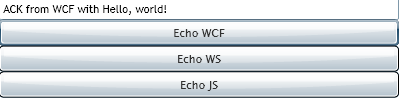
The challenge today is really simple. All we have to do is to write Silverlight Vista Sidebar Gadget, that consumes either WCF, ASMX or REST based service. Really simple, isn’t it? Let’s start

image

Build server side services

We should start from services. This is very straight forward mission. Here the logic I want to implement

public string Echo(string input)
    {
        return string.Format("ACK from {0}", input);
    }

Well, WCF? We should mark service and operation contracts. That’s all

[ServiceContract(Namespace = "")]
public class EchoService
{
    [OperationContract]
    public string Echo(string input)
    {
        return string.Format("ACK from WCF with {0}", input);
    }

}

This does not works. Why? Silverlight knows only consumes ASP.NET compatible (simplified) web services, thus we should add following attribute to the our class attributes collection

[ServiceContract(Namespace = "")]
[AspNetCompatibilityRequirements(RequirementsMode = AspNetCompatibilityRequirementsMode.Allowed)]
public class EchoService
{

Now, the service is discoverable and accessible by Silverlight. Great news. Now let’s put it into our shared host. Hmm, we got strange error: “Deploying WCF Services: This collection already contains an address with scheme http.” What the hell is it?

This is shared hosting problem. Your host provider uses virtual IP and host addresses and has number of different web services, sitting on the same shared host. How to solve it?

Simple, all you have to do is to specify your own service host factory. Here the example of classes to put into code behind

class SLHostFactory : ServiceHostFactory
{
    protected override ServiceHost CreateServiceHost(Type serviceType, Uri[] baseAddresses)
    {
        SLHost customServiceHost =
          new SLHost(serviceType, new Uri("[Your URL goes here]",UriKind.Absolute));
        return customServiceHost;
    }
}

class SLHost : ServiceHost
{
    public SLHost(Type serviceType, params Uri[] baseAddresses)
        : base(serviceType, baseAddresses)
    { }
    protected override void ApplyConfiguration()
    {
        base.ApplyConfiguration();
    }
}

And one attribute into your service tag

Factory="SLHostFactory"

Now it works. So what’s next? Build ASMX web service. This is even simpler

[WebMethod]
public string Echo(string input)
{
    return string.Format("ACK from web service with {0}", input);
}

We done, now either WCF and Web services are accessible from your Silverlight application. So, add Service reference and consume it

Building client side

Inside code behind of your Silverlight project, you should define two proxies – one for Web Service and another for WCF service. Bother services implements the same interface, so it should not be a problem

ServerEcho.EchoServiceClient proxy;
WebServiceEcho.EchoWebServiceSoapClient wsProxy;
private void UserControl_Loaded(object sender, RoutedEventArgs e)
{
    proxy = new ServerEcho.EchoServiceClient();
    proxy.EchoCompleted += new EventHandler<ServerEcho.EchoCompletedEventArgs>(proxy_EchoCompleted);

    wsProxy = new SLGadget.WebServiceEcho.EchoWebServiceSoapClient();
    wsProxy.EchoCompleted += new EventHandler<SLGadget.WebServiceEcho.EchoCompletedEventArgs>(wsProxy_EchoCompleted);
}

Silverlight work only asynchronously, thus you should begin to understand, that synchronous programming is for pussies :). Consume it

private void WCF_Click(object sender, RoutedEventArgs e)
        {
            proxy.EchoAsync(txt.Text);
        }

        private void WS_Click(object sender, RoutedEventArgs e)
        {
            wsProxy.EchoAsync(txt.Text);
        }

And Update output

void wsProxy_EchoCompleted(object sender, SLGadget.WebServiceEcho.EchoCompletedEventArgs e)
        {
            txt.Text = e.Error == null ? e.Result : (e.Error.InnerException != null ? e.Error.InnerException.ToString() : e.Error.Message);
        }

        void proxy_EchoCompleted(object sender, ServerEcho.EchoCompletedEventArgs e)
        {
            txt.Text = e.Error == null ? e.Result : (e.Error.InnerException != null ? e.Error.InnerException.ToString() : e.Error.Message);
        }

Now let’s run it. What? Another error? Security? Access denied? Of cause you have no crossdomain.xml.

<?xml version="1.0"?>
<!DOCTYPE cross-domain-policy SYSTEM "http://www.macromedia.com/xml/dtds/cross-domain-policy.dtd">
<cross-domain-policy>
<allow-access-from domain="*" />
</cross-domain-policy>


What? You have it and still getting the same error? Look into sniffer. You application is looking for other file, named clientaccesspolicy.xml. Why? According the documentation, you can use either… Hm, another bug with WCF consuming. Never mind, let’s put it too


<?xml version="1.0" encoding="utf-8"?>
<access-policy>
<cross-domain-access>
<policy>
<allow-from http-request-headers="*">
<domain uri="*"/>
</allow-from>
<grant-to>
<resource path="/" include-subpaths="true"/>
</grant-to>


    </policy>
</cross-domain-access>
</access-policy>


Very well, now we are ready to run our application. It works! So, the only thing we should do is to pack it into MyGadget.gadget directory and put inside %userprofile%\appdata\local\microsoft\windows sidebar\gadgets together with gadget.xml manifest.


But… It stopped working… What’s the problem?


Very client side networking in Silverlight


The problem is, that SideBar executes it’s gadgets with local path, not with network path. Silverlight cannot use any network provider, when running locally. Why? Actually I do not know (maybe to prevent local applications development). so what to do?


Simple! Microsoft SideBar knows to run cross domain AJAX without any warnings and problems. So why not to use external XmlHttp from JavaScript for network access. Let’s do it


First we should initialize XMLHttpRequest object in JavaSctipt


var xObj;

        function getEchoWCF(text) {


            if(xObj == null) {   
                xObj = new XMLHttpRequest();


                }


            else if(xObj) {


                xObj.abort();


            }


Then create SOAP request to WCF or WebService


var sURL = "[Path yo your service]";

            //Build SOAP


            var sReq = "<s:Envelope xmlns:s=\"http://schemas.xmlsoap.org/soap/envelope/\"><s:Body><Echo><input>"+text+"</input></Echo></s:Body></s:Envelope>";


            xObj.open("POST", sURL, true);


            xObj.setRequestHeader( "Content-Type", "text/xml; charset=utf-8" );


            xObj.setRequestHeader( "Cache-Control", "no-cache" );


xObj.send(sReq);


After the request created and send we should handle result. So we need an access from HTML page, hosting Silverlight object to Silverlight. Simple. “ScriptableMember - ScriptableType”, remember?


[ScriptableType]

    public partial class Page : UserControl


    {


[ScriptableMember]

        public void UpdateResponse(string result)


        {


Now return the result


xObj.onreadystatechange = function() {

            if (xObj.readyState === 4) {


                if (xObj.status && xObj.status === 200) {   
                    var control = document.getElementById("silverlightControl");


                    control.Content.Page.UpdateResponse(xObj.responseText);


                }


            }


But this is not enough. We also should know to call Javascript from Silverlight… This is really simple


private void JS_Click(object sender, RoutedEventArgs e)

        {


            HtmlPage.Window.Invoke("getEchoWCF", txt.Text);


        }


We done. Now you can pack your Silverlight control, together with hosting HTML and Javascript into windows sidebar gadget and use it even with external network support.


Have a good day and be nice people.



Sunday, June 22, 2008

Mastering Images in WPF

If you are “in” WPF imaging, you, definitely, should read this post of Dwayne Need (who is SDM of WPF in Microsoft) about customizing BitmapSource. A ton of information about how to make Bitmap Source for your needs, what WIC is and how to use it. Also he has a lot of samples in CodePlex. Great work, Dwayane.

Thursday, June 19, 2008

Quick Silverlight tip: How to set format and validate value in TextBox?

Today morning I got an email from one of Microsofties, asking following question:

Is there any way to set format and validation on TextBox in Silverlight 2. TextBox format: Date Format, Currency Format etc, TextBox validation: Regular date expression, should allow only numeric etc. If it’s possible out-of-box how do I do it?

The answer is, that there is no data validation or formatting in Silverlight, however it’s very simple to build converter to format binded value. Here the code of the converter:

public class TextFormatConverter:IValueConverter
   {

       #region IValueConverter Members

       public object Convert(object value, Type targetType, object parameter, System.Globalization.CultureInfo culture)
       {
           return Format(value, parameter);
       }
       public object ConvertBack(object value, Type targetType, object parameter, System.Globalization.CultureInfo culture)
       {
           return Format(value, parameter);
       }

       object Format(object value, object param)
       {
           if (value == null)
               return value;
           int ri;
           double rd;
           if (int.TryParse(value.ToString(), out ri))
           {
               return string.Format(param.ToString(), ri);
           }
           else if (double.TryParse(value.ToString(), out rd))
           {
               return string.Format(param.ToString(), rd);
           }
           else
           {
               return string.Format(param.ToString(), value);
           }
       }

       #endregion
   }

Here the usage:

<TextBox Text="{Binding String, Source={StaticResource data}, Mode=TwoWay, Converter={StaticResource formatConverter}, ConverterParameter='{0:0.00}'}" />

Regarding validators – There is no ValidationRule or IDataErrorInfo in Silverlight right now. If you want to have it, you’ll need to write your own custom TextBox with validation. But, I’ll speak next time about it. ValidatingTextBox with format support will be a part of Silverlight controls library when I’ll have a time for it.

Have a nice day and be good people.

Wednesday, June 18, 2008

The truth about HTC has been revealed!

HTC is underground factory, that manufacturing cat eater cyborgs (Cats? Why Cats? Don’t you know, what PDA is? It’s Pussy Defended Asset. Other words male mouser). Especially, those cyborgs eat cats is disguise of Mobile Phones.

Cat-eater

Where HTC located?

HTC located on the moon. Not in China. The facility is in one of moon craters inside the old spacecraft, abandoned by HAL from a space odyssey. Once a year, this moonbus rides to the Earth with new cyborgs production on board.

HTC production

At glance, the production of HTC looks like a regular mobile phones, however it has no phone capabilities. Therefore, once it leaves moonbus it eats fist mobile phone found. Momentarily after, cyborg’s internal infrastructure adopts the consumed cat and starts to operate as long as life endures, producing the illusion, that the cyborg is regular mobile phone.

However, the main mission of HTC production is to eat cats. It do the offense nightly, when the owner sleeps. It comes out and every time, seeing a cat, exclaims: “Hey, That’s Cat!”, then swallows the victim. Once the cyborg loaded up, it return to the owner.

The other ability of HTC production is zombying of its owners. It washes their brains and commands them to think, that cyborgs are the best mobile phone ever. All other phones are missing of features and very user unfriendly. Because of it, most of mobile phone owners forgot how to use regular mobile phones.

Cyborg detection

In spite of good camouflage, it’s possible to detect cyborgs:

  • Occasional pressing of phone screen does nothing for regular mobile phones, however cyborgs very sensitive to this action
  • Upper cover of the cyborg consists of strange rectangle thing. It’s the antenna, used by the cyborg for zombying owners.
  • One of following words might appear in cyborg’s front or back panel: i-mate,t-mobile,eten,asus,htc,orange,AT&T
  • Sustained use of cyborgs causes headache or migraine.

The cyborgs are extremely dangerous for cat population of the Earth, thus every time, you detect the cyborg, please, report to WWF, Heath Officer or FBI.

Thank you for cooperation.

[illustration by DaKraken, inspired by absurdopedia]