Showing posts with label Soft. Show all posts

Sunday, November 09, 2008

Programming for Windows 7

Well, Windows 7 is going to be released by the end of next year. This is great news, because it seemed, that Microsoft finally understand how to get the best of Windows Vista and make it to work not only on monster machines.

image

It even works on new brandy my wife's pinky machine. And if it works there and my wife is happy with it, this OS going to be very impressive.

image

But from the other hand, we, as developers should be ready today to developer Windows 7 ready application (by the way, Vista Battery Saver works for Windows 7 as well as for Windows Vista, in spite of the fact, that power management in Windows 7 was improved dramatically). So let's start!

First thing we need is to read big Windows 7 Developer Guide. This document will explain most of new features for developers to build applications right. What is includes?

Windows Driver Kit (WDK) 3.0

Basically, Windows 7 works with Vista drivers, however, hibernation, power management, networking, PREfast will work much better. You also will have new WMI access for reliability monitors and ACPI.

Management and deployment

By default Windows 7 uses PowerShell 2.0 and Windows Installer. For PowerShell it includes enhanced cmdlets to manage Active Directory, IIS, etc. For Windows Installer, you finally can build "chainers" by yourself (the same approach, used for latest deployment of Microsoft products such as Silverlight, Visual Studio 2008 SP1 etc.) Also, you can get advantage by using Windows Filtering Platform (Firewall) and User Account Control (UAC) from inside your application by using new APIs.

Performance

The most significant change in Windows 7 for end-user point of view is improved performance. Windows 7 kernel is much smaller, that kernel of Windows Vista. Also it uses specific patterns to decrease background activities on low power, based on system triggers. New user-mode and kernel-mode APIs are used by Windows Drivers Foundation much more efficiently. Also system services are much smarter. For example, DCIA starts only when you connect new hardware. After drivers were installed the service shuts down. The same approach used by domain join, GP changes, new IP fetching etc. Windows 7 knows to run and stop services, based on system events, which decreases average work load and enhances whole system performance.

Multi-touch gestures and Interia API and used interface in general

Yes, you can use this API for your applications. Finally we can have more, then just mouse. And it is not only about multiple mouse devices. We can use single finder panning, raw touch input data, internal multitouch ink recognition, which is also supports math. Also it uses build-in MathML export feature.

There are a lot of other enhancements, such as smart bars, windows' stacking, gadget desktop (it does not eat battery as external process anymore), system ribbon menu integration. etc

Graphics

Direct 11, new Direct2D, DirectWrite (we can turn text anti-aliasing for small fonts, hurrah!), improved WIC, DX/GDI interoperability on system level with automatic fallback for weak hardware (yes, you should not be worry about it anymore). Also new video and audio format support with human readable interfaces. Yes, no more DirectDraw hacks. We can use new high level interfaces such as MFPlay to manage playbacks, Source Reader for decoding, Sink Writer for transcoders and re-coding compressions.

Web and communication

WCF is inside, as well as distributed routing table for peer-to-peer operations. BranchCache - new technology to reduce WAN traffic and latency.

Also Windows 7 is compatible with OpenSearch (I told, that Microsoft does not know to build search engines). Sharepoint integration and environment sensors platform, that can be used either for desktop and web applications.

There are much more features, that makes Windows 7 to pretend to be very good operation system. If you want to learn more about all those Windows 7 new features, I highly advice you to download and read this document. It includes most of new features of new OS with explanations and screenshots to make your learn and understand what can your future application do with all those new features.

Have a nice day and be good people.

BTW, if you have PDC version of Windows 7 and want to unlock it for using of some cool features, introduced during keynotes, it worth to visit here and learn how to :)

Download Windows 7 Developer Guide and start programming.

Saturday, October 11, 2008

Issues, you reported were fixed

Hi, folks. And thank you for reporting issues with WpfPerf Performance Profiling tool. Now it was fixed, so, download and use new and fixed version.

Keep reporting, as you can see, you have the power to change!

image

Imaginary by Malcolm Dare

Saturday, October 04, 2008

Free Microsoft Expression series video training catalogs

MSDN download center just published video catalogs, where you can find sample chapters of Total Training’s video series for Microsoft Expression studio. Worth to download and see. Here the breakdown by products

Also, if you are “in” Office development, it makes sense to take a look in to Data Connectivity Components for Office 2007 System. It can be used by non-Microsoft Office applications to read data from Office system files.

Happy downloading!

Monday, September 29, 2008

For all those, who have problems with running WPF Performance Profiling tool – Microsoft cares

Three days ago, I announced the new release of WPF Performance Profiling Tool. A couple hours after this was announced, I got a number of comments from you, readers. It was about issues with running this tool. I checked the issue and forwarded it to development team from Microsoft. The problem was in bad parsing of comma and point characters in this tool, when using it on non-US locale. Dev team took care about it and hopefully they will provide a fix soon.

Thank you for reading my blog, reporting and your awareness of such issues. This is very important to me and I’m really appreciate your efforts to help us to develop WPF community.

I’ll update you as soon as the patch will be available.

Thank you and Shana Tova!

image

Friday, September 26, 2008

The new version of WPF Performance Profiling Tool is available for download

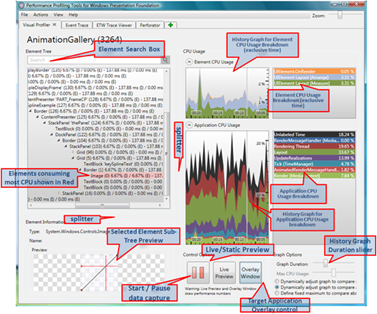
Finally, after a long time of silence, the new version of WPF Performance Profiling Tool is available for download for x32 and x64 OSs.  So, what’s new there?

Ton of UI improvements for Visual Profiler

image

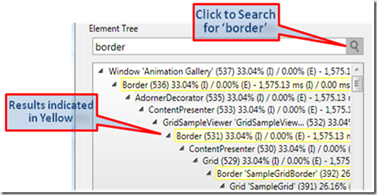
New search function to quick find elements in visual tree

image

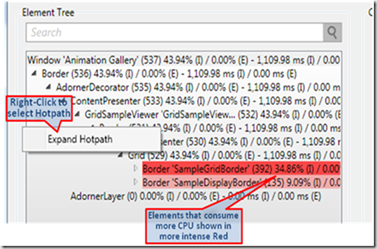
Hot path (critical path) of CPU usage aside with CPU usage for single element

image

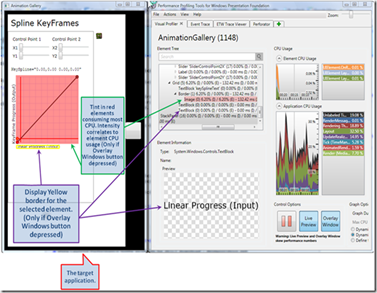
Configuration of tint for overlay windows

image

Live preview, ability to split columns, slider of graph duration, expanders to have cleaner screen and much much more

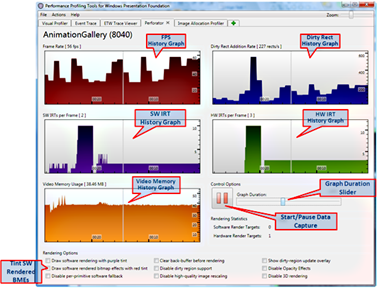
Perforator also got new UI and has history now.

image

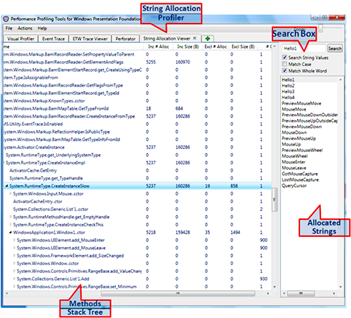
There is new tool, named String allocation profiler

image

This tool is very useful for viewing and managing strings inside your application (another step toward normal localization support for WPF? Probably)

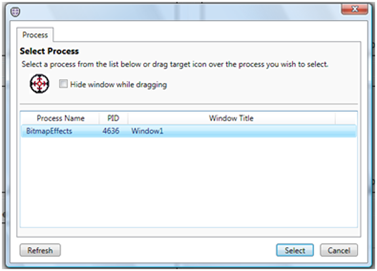
There are also some improvements in Event tracing tool. Select process for example :)

image

And much much more. Great thank to Josef and his team for this great work

Download the new version of WPF Performance Profiling Tool >>

Monday, September 22, 2008

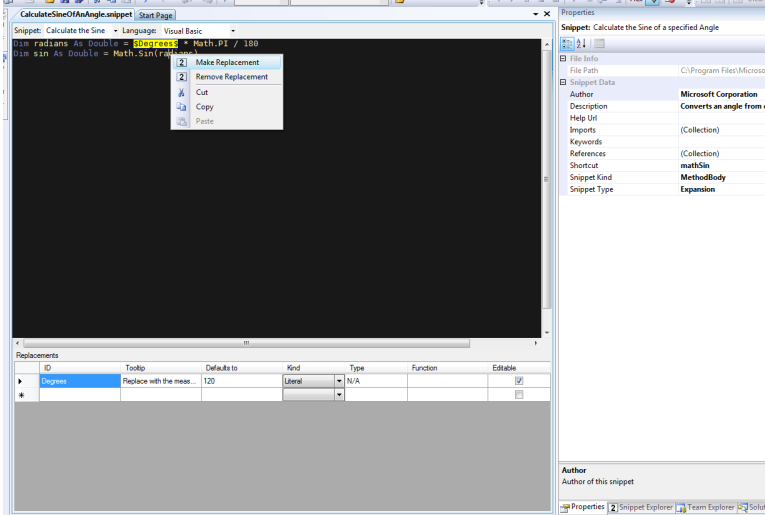
Visual Studio snippet designer

Chicks love CodePlex as well as Microsoft loves it too and today they release extremely useful tool, that was internal for more, then three years. It named: “Visual Studio Snippet Designer”.

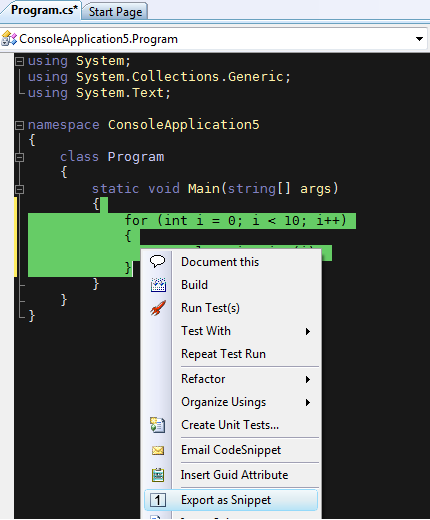
image

As you can, probably, understand. This tools is used to create and manage VS time savers - snippet files (introduced in VS2005)

image

This is great tool, that will help you a lot to save your time during regular everyday development. Any other word is unnecessary. Download, install and use it!

Thursday, July 17, 2008

Arabic and Hebrew languages bidirectional support for Silverlight 2.0 beta 2

Those days, I’m, together with guys from Microsoft Egypt and Santeon, finishing development of bidirectional input and output support for Silverlight. I want you to take part in alpha testing of this solution. Please see the test form here and try it.

Also, you can download latest development build and try it yourself. Please, if you’re in any issue, report it, by using issue tracker in CodePlex.

In order to use it, all you have to do is to use custom namespace within your project and then, you’ll be able to get almost all controls, you know, but with Arabic and Hebrew RTL and LTR support. You have to set one property: FlowDirection to change the rendering method (exactly as in WPF). Here an example of usage.

<UserControl x:Class="BidiTest2.Page"
    xmlns="http://schemas.microsoft.com/winfx/2006/xaml/presentation"
    xmlns:x="http://schemas.microsoft.com/winfx/2006/xaml"
    xmlns:l="clr-namespace:System.Windows.BidiControls;assembly=BidiControls">

<l:TextBlock FlowDirection="LeftToRight" Text="שלום עולם"/>

<l:TextBox FlowDirection="RightToLeft" Text="{Binding Text, Mode=TwoWay}"/>

That’s all. Thank you for your cooperation.

image

Tuesday, July 15, 2008

Mobile version of this blog

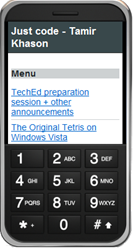
10x to great service of mofuse, I have mobile version of this blog now. So bookmark it: http://m.0x15.net/

image image

Here the QR code for your convenience

image

Sunday, June 15, 2008

Silverlight controls library has been upgraded to Beta 2

Finally this weekend I got  a time to upgrade one of my OpenUp submissions, Silverlight controls library to work with Silverlight 2.0 beta 2. It was very interesting to track changes between developer’s (beta 1) and production (beta 2) go-live licenses. Let’s try to understand what has need changed.

  1. Syntax of DependencyProperty registration. Now instead of DependencyProperty.Register(name, propertyType,ownerType,propertyChangedCallback) you should use DependencyProperty.Register(name, propertyType,ownerType,typeMetadata), which, actually receives only one parameter in constructor – propertyChangedCallback. This make Silverlight to be closer to WPF syntax and open it for future enhancements. You can download updated Visual Studio 2008 snippet for creation of Silverlight Dependency Properties.
  2. OnApplyTemplate method of UserControl become public instead of protected
  3. Thumb DragDelta event argument is not DragEventArg anymore. Now it’s DragDeltaEventArgs. So there is no HorizontalOffset and VerticalOffset attributes. They replaced by HorizontalChange and VerticalChange
  4. DefaultStyleKey is not null anymore
  5. Most of controls migrated from System.Windows.Controls into System.Windows namespace
  6. Some changed to ToolTip service
  7. Now Silverlight checks whether TargetType property of Style is really compatible with the control, you’re applying style to (this not happened in beta 1). Also DependencyObject.SetValue() method checks it’s type.
  8. There is no InitializeFromXaml anymore. Now Silverlight works more “WPF style” with application services – Application.LoadComponent()
  9. You cannot use x:Name and Name property together (someone did it?)

There are a ton of other changed, that was not related to Silverlight Control Library. For example, changed within Storyboard class, networking, cross-domain policy, other controls (e.g. DataGrid), Templates of some controls (e.g. Button, TextBox, etc) and API.

Also I want to invite you to take part into development of Silverlight controls library not because of complimentary ticket to PDC ‘08 or Mobile Memory Mouse 8000, but because Open Source is not “one-men-show”. To get access to SVN, submit your work and begin development of next generation of Silverlight controls, contact me via CodePlex and I’ll add you to the project as new contributor.

Thursday, June 05, 2008

Quick note: New TechEd downloads

There is TechEd in Orlando, and this means, that there are a lot of new announcements. Let’s fill up our download managers with expensive fuel and start.

Silverlight 2.0 beta 2 + Microsoft Expression Blend 2.5 June preview will be available for download very soon. Keep watching. Meanwhile, you can start learn about new TabControl, VisualStateManager, new templating system and cross-domain policy from Tim Heuer’s blog. Also there are some news about event bubbling in beta 2 in Jesse’s blog.

Monday, May 26, 2008

How to protect your Intellectual Property or some words about next generation obfuscation

Not once customers asking me about protecting their IP (not address). The regular answer was “obfuscation”. You want more, then this? Use third party unmanaged hash providers (such as RemoteSoft, which is the best so far). However it not enough. the best we can do is to provide sensitive code as remote service. The only way to “hack” such protection is by hacking remote server, which is much more complex mission, in comparison to hacking managed or even native code.

image
© Don Farrall

For a long time Microsoft has no ultimate answer to IP issues of managed code. Sun experienced the same problems with Java. what to do? The answer is to provide comprehensive solution for server side code encoding. This is exactly what was done in Microsoft Software Licensing and Protection Services. This is not free, however it can provide you with comprehensive solution for IP protection, licence management and secure software distribution.

After applying to this service, your code will looks like this

return SLMRuntime.SVMesecMethod(a);

Where SVMesecMethod is server side method, rather then

return MyEncriptor.DecodeString(a);
string DecodeString(string a) {
for ( long offset = 0; offset < a.Length ; offset++ )
                {
                    i = ( i + 1 ) % a.Length ;
                    j = ( j + a[i] ) %  a.Length ;
                    byte temp =  a[i];
                    a[i] = a[j];
                    a[j] = temp;
                    byte a = a[offset];
                    byte b = a[(a[i]+a[j])% a.Length ];
                    a[offset] = (byte)((int)a^(int)b);   
                }   
}

Where DecodeString is maybe complicated (this code actually does not work), but easy reflected source.

SLP service is not new approach. It widely used by different companies to protect their software. Also it’s very common way to distribute Smart Client applications. However this is first time Microsoft provides such service widely for ISVs.

You can request evaluation of this service today, by visiting SLP website.

Thursday, March 13, 2008

Localization fix for SAP ESA Explorer for Visual Studio

A couple of days ago, new great product [PDF] was released by SAP together with Microsoft. It named SAP Exterprise Services Explorer for Microsoft .NET (you can download sneak preview for free). It still in beta, however there is already major issue - it does not work in localized version of Visual Studio. Neither 2005 nor 2008. Why this happens? The reason is simple. Visual Studio always asks for localized resources for addins and there is no way to work around it.

From one hand, it's bad, that such global company as SAP does not want to localize it's products. From the other hand, there are very few developers, who working with localized versions of development environment. Anyway I started to look into the product to understand what has been done by developers. Oh, my god. They put resources into GAC. How to get them out there?

Actually, GAC is regular windows directory, that exists in %windir%\assembly\GAC\ or %windir%\assembly\GAC_MSIL\. But smart Windows replaces regular Explorer view by customize ActiveX. This does not mean, that you cannot pick files from there. To prove it map GAC folder to another disk. From command line run following command "subst z: %windir%\assembly\GAC_MSIL\". Now you have your GAC mapped to network virtual drive Z

So, if it is regular directory, you can get files from there and put it into any place you want. But why copy it if we can use hard links?

What's the hell are "hard links"? Hard links are symbolic links or symlinks, we know from Unix environment. Yes, you ca ln -fs in Windows :) To do it, you should use file system utility, named fsutil. Actually, those only pointers to real files in your file system. So, "fsutil hardlink create <copy> <original>" will do the work.

Now, when we know where to get those files and how to make symbolic links to them, we should know what versions of Visual Studio we have installed and what are languages of those products. To do this, we have to make a small trip into registry and look into HKLM\SOFTWARE\Microsoft\DevDic\VS\Servicing. There we will find node 8.0 if VS2005 installed and 9.0 if VS2008 installed. Actually, we can pick all necessary information there. Let's see. This key build according following pattern: HKLM\SOFTWARE\Microsoft\DevDiv\[Product Family]\Servicing\[Product Version]\[Product Edition]\[Product Language]. That's exactly what we need. But what are possible values?

  • Product family
    • URT - .NET framework
    • VB - Visual Basic Express
    • VC - Visual C++ Express
    • VCS - Visual C# Express
    • VJS - Visual J# Express
    • VNS - Visual Web Developer Express
    • VS - Visual Studio (all versions)
    • VSTF - Visual Studio Team Foundation Services
  • Product version
    • 8 (or 8.0) - 2005
    • 9.0 - 2008
  • Product Edition
    • VSTD - Standard
    • PRO - Professional
    • VSTS - Team System
  • Product Language
    • Integer of Culture identifier (or other words LCID)

Now, when we know what versions and what languages are installed we should detect where Visual Studio is installed. In this case, we'll need another registry key "HKLM\SOFTWARE\Microsoft\VisualStudio\". Under this node we'll find again 8 or 9 and then value "InstallDir", that, actually, tells us where the current version of Visual Studio is installed.

Last thing to remember, that Visual Studio looks into it's root directory (that we detected in previous step) for directory with two letter ISO language code and resources there.

At this point we know all necessary information in order to work, so we have our program ready. You can, even download and use it :)

image

So, after running and clicking "Apply fix" button (if possible - you have SAP ESA Explorer and localized version(s) of Microsoft Visual Studio), we can start using this great product in any available version of Visual Studio. In English of cause)

image

Have a nice day and do not forget, that not everyone work with English version of development tools.

Download Localization fix for SAP ESA Explorer for Visual Studio 2005 and 2008 (no installation needed - just unzip and run) >>

Wednesday, March 12, 2008

Deep Zoom composer for download

One of best technologies, presented at Mix'08 was HardRock Memorabilia. It uses technology, previously named Seadragon to adapt image resolution and size to what you're currently viewing. It montages number of images in different resolutions and then dispatches them upon your request. Take a look into Silverlight 2.0 poster, created by Joe Stegman

Now, the million dollar question, how to use it in my application? Simple just download and use it :)

Download Deep Zoom Composer for Silverlight>>

Wednesday, February 13, 2008

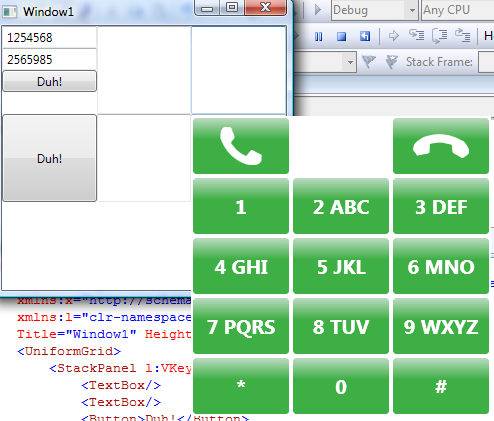
Building Virtual Keyboard in WPF - Custom editors, accessibility and attached properties

The challenge - build alternative on-screen keyboard to appear on each textbox, marked to use such keyboard.

The reason - custom editor, ability to use touch screen input, etc

Realization: WPF, two windows, a little hooking, attached properties, custom commands and gestures.
image

Let's start working. First of all, we should provide ability to "attach" new control to any textbox (richtextbox) in any application. For this purpose, we'll use attached events, so, syntax will looks like this

<TextBox/>
<TextBox l:VKeyboard.AttachVKeyboard="true"/>

Also, we do not want to attach it to really any textbox, we should be able to do it for upper containers. Something like this

<StackPanel l:VKeyboard.AttachVKeyboard="true">
            <TextBox/>
            <TextBox/>
            <Button>Duh!</Button>
        </StackPanel>

Our custom keypad should appear above the window, under the control it attached to and should not be worry about lost focus. Thus we can not use neither Popup and Tooltip. We'll use custom borderless window

public class VKeyboard : Window

We should be able to change skins and override it's templates, so we'll create ResourceDictionary for this window and write it's default template.

<Style TargetType="{x:Type local:VKeyboard}">
        <Setter Property="Topmost" Value="True"/>
        <Setter Property="ShowInTaskbar" Value="False"/>
        <Setter Property="Focusable" Value="False"/>
        <Setter Property="Background" Value="White"/>
        <Setter Property="Width" Value="300"/>
        <Setter Property="Height" Value="300"/>
        <Setter Property="Template">
            <Setter.Value>
                <ControlTemplate TargetType="{x:Type local:VKeyboard}">
                    <Border Background="{TemplateBinding Background}"
                            BorderBrush="{TemplateBinding BorderBrush}"
                            BorderThickness="{TemplateBinding BorderThickness}"
                            Focusable="False">
                        <Grid>

We must allow of using input from this control externally, so we'll create RoutedUICommand for each of our buttons

<Button Command="local:VKeyboard.ButtonCallPressedCommand" Grid.Column="0" Grid.Row="0" Content="{StaticResource CallImg}"/>
                            <Button Command="local:VKeyboard.ButtonEndPressedCommand" Grid.Column="2" Grid.Row="0" Content="{StaticResource EndCallImg}"/>
                            <Button Command="local:VKeyboard.Button1PressedCommand" Grid.Column="0" Grid.Row="1" Content="1"/>
                            <Button Command="local:VKeyboard.Button2PressedCommand" Grid.Column="1" Grid.Row="1" Content="2 ABC"/>
                            <Button Command="local:VKeyboard.Button3PressedCommand" Grid.Column="2" Grid.Row="1" Content="3 DEF"/>
                            <Button Command="local:VKeyboard.Button4PressedCommand" Grid.Column="0" Grid.Row="2" Content="4 GHI"/>
                            <Button Command="local:VKeyboard.Button5PressedCommand" Grid.Column="1" Grid.Row="2" Content="5 JKL"/>
                            <Button Command="local:VKeyboard.Button6PressedCommand" Grid.Column="2" Grid.Row="2" Content="6 MNO"/>
                            <Button Command="local:VKeyboard.Button7PressedCommand" Grid.Column="0" Grid.Row="3" Content="7 PQRS"/>
                            <Button Command="local:VKeyboard.Button8PressedCommand" Grid.Column="1" Grid.Row="3" Content="8 TUV"/>
                            <Button Command="local:VKeyboard.Button9PressedCommand" Grid.Column="2" Grid.Row="3" Content="9 WXYZ"/>
                            <Button Command="local:VKeyboard.ButtonStarPressedCommand" Grid.Column="0" Grid.Row="4" Content="*"/>
                            <Button Command="local:VKeyboard.Button0PressedCommand" Grid.Column="1" Grid.Row="4" Content="0"/>
                            <Button Command="local:VKeyboard.ButtonHashPressedCommand" Grid.Column="2" Grid.Row="4" Content="#"/>

A little "beauty" and we done

<Grid.Resources>
                                <Path x:Key="CallImg" Stretch="Uniform" Fill="#FFFFFFFF" Margin="8,8,8,8" Data="F1 M 0.65625,31L 0,30.5C 0.247479,21.7008 -0.845665,11.3964 4.625,4.5C 5.99938,2.76746 7.50086,0.945534 9.5,0C 10.8189,-0.623779 25.7734,-0.289833 27,0.5C 30.6887,2.87514 30.7009,8.45779 32.4063,12.5C 34.0938,16.5 36.8862,20.1979 37.4688,24.5C 38.2858,30.5337 30.8386,34.8158 28.6563,40.5C 27.4057,43.7572 32.0234,46.625 34,49.5C 38.7071,56.3467 44.4278,62.889 51.5,67.25C 54.5603,69.1371 57.6135,71.0564 60.8333,72.6563C 61.9444,73.2083 63.0556,73.7604 64.1667,74.3125C 65.2778,74.8646 66.3323,76.388 67.5,75.9688C 69.4896,75.2544 70.659,73.1342 72,71.5C 72.5881,70.7833 75.9005,66.8194 77,65.5C 78.7419,63.4098 80.8023,60.2078 83.5,60.5625C 88.2582,61.1881 92.1,64.825 96.4,66.9563C 97.8333,67.6667 99.2667,68.3771 100.7,69.0875C 102.133,69.7979 103.57,70.5016 105,71.2188C 106.337,71.8891 108.2,71.9867 109,73.25C 109.725,74.3947 108.906,75.9583 108.859,77.3125C 108.813,78.6667 108.766,80.0208 108.719,81.375C 108.672,82.7292 108.625,84.0833 108.578,85.4375C 108.531,86.7917 109.037,88.285 108.438,89.5C 105.738,94.9684 99.4967,98.9543 93.5,100.063C 89.3677,100.826 73.8381,99.7891 72.5,99.375C 71.6472,99.1111 66.269,97.6981 65.5,97.375C 58.3355,94.3649 51.1421,91.284 44.5,87.25C 24.181,74.9095 8.33594,53.4982 0.65625,31 Z "/>
                                <Path x:Key="EndCallImg" Stretch="Uniform" Fill="#FFFFFFFF" Margin="15,15,15,15" Data="F1 M 108.66,31.2772L 109.485,31.2593C 114.774,38.2957 122.05,45.6741 122.068,54.4768C 122.073,56.6882 122.033,59.0488 121.059,61.034C 120.416,62.3437 108.512,71.4007 107.06,71.5473C 102.695,71.988 99.2068,67.6293 95.3543,65.5303C 91.5421,63.4532 87.0538,62.3009 83.9175,59.2991C 79.5188,55.089 82.6754,47.0995 80.8404,41.2938C 79.7889,37.967 74.3904,38.6013 71.0529,37.5842C 63.1051,35.1622 54.5542,33.6098 46.3054,34.6056C 42.736,35.0365 39.152,35.4378 35.6368,36.1928C 34.4237,36.4534 33.2107,36.7139 31.9976,36.9744C 30.7846,37.235 29.0106,36.7005 28.3585,37.756C 27.2475,39.5545 27.654,41.9414 27.6234,44.0552C 27.6099,44.9822 27.4891,50.1465 27.4513,51.8635C 27.3914,54.5837 27.7749,58.372 25.444,59.7755C 21.3326,62.2511 16.0616,61.8004 11.3704,62.8128C 9.80669,63.1502 8.24296,63.4877 6.67923,63.8252C 5.1155,64.1627 3.55334,64.5075 1.98804,64.8376C 0.524829,65.1462 -0.993193,66.2309 -2.40619,65.7413C -3.68651,65.2977 -4.02044,63.5646 -4.82757,62.4762C -5.63469,61.3879 -6.44182,60.2995 -7.24894,59.2112C -8.05607,58.1228 -8.86319,57.0345 -9.67032,55.9461C -10.4774,54.8578 -11.8037,54.0051 -12.0917,52.6811C -13.388,46.7222 -10.9898,39.7154 -6.99004,35.1121C -4.23386,31.94 8.5586,23.0745 9.86325,22.5646C 10.6947,22.2396 15.7816,19.9936 16.5844,19.7672C 24.0637,17.6572 31.6096,15.5847 39.3183,14.6011C 62.8999,11.5922 88.6345,18.4657 108.66,31.2772 Z "/>
                                <LinearGradientBrush x:Key="BackgroundBrush" EndPoint="0.5,1" StartPoint="0.5,0">
                                    <GradientStop Color="#FFBADAC0" Offset="0"/>
                                    <GradientStop Color="#FF3EAF44" Offset="0.379"/>
                                </LinearGradientBrush>
                                <LinearGradientBrush x:Key="BackgroundPressBrush" EndPoint="0.5,1" StartPoint="0.5,0">
                                    <GradientStop Color="#FFBADAC0" Offset="1"/>
                                    <GradientStop Color="#FF3EAF44" Offset="0.308"/>
                                </LinearGradientBrush>
                                <Style TargetType="{x:Type Button}" BasedOn="{x:Null}">
                                    <Setter Property="Background" Value="{StaticResource BackgroundBrush}"/>
                                    <Setter Property="BorderBrush" Value="{StaticResource BackgroundBrush}"/>
                                    <Setter Property="Foreground" Value="White"/>
                                    <Setter Property="FontStretch" Value="UltraExpanded"/>
                                    <Setter Property="FontWeight" Value="Black"/>
                                    <Setter Property="FontSize" Value="20"/>
                                    <Setter Property="Margin" Value="2,2,2,2"/>
                                    <Setter Property="Template">
                                        <Setter.Value>
                                            <ControlTemplate TargetType="{x:Type Button}">
                                                <Grid x:Name="Grid">
                                                    <Rectangle x:Name="Background" RadiusX="3" RadiusY="3" Stroke="{TemplateBinding BorderBrush}" Fill="{TemplateBinding BorderBrush}"/>
                                                    <ContentPresenter HorizontalAlignment="{TemplateBinding HorizontalContentAlignment}" Margin="{TemplateBinding Padding}" VerticalAlignment="{TemplateBinding VerticalContentAlignment}" RecognizesAccessKey="True"/>
                                                </Grid>
                                                <ControlTemplate.Triggers>
                                                    <Trigger Property="IsPressed" Value="true">
                                                        <Setter Property="Fill" Value="{StaticResource BackgroundPressBrush}" TargetName="Background"/>
                                                    </Trigger>
                                                </ControlTemplate.Triggers>
                                            </ControlTemplate>
                                        </Setter.Value>
                                    </Setter>
                                </Style>
                            </Grid.Resources>

Another small touch - if we'll AllowTransparency and set WindowStyle within our resource dictionary or it's style we'll get an exception "Cannot change AllowsTransparency after Window has been shown." The reason is simple - styles applies after the window handler created, thus we can not change transparency within template. Thus WindowStyle none cannot be applied there as well. We'll put it into default constructor.

public VKeyboard()
{
    this.AllowsTransparency = true;
    this.WindowStyle = WindowStyle.None;           
}

After we done with the control, let's start to build business logic. First of all routed commands

public static RoutedUICommand ButtonCallPressedCommand = new RoutedUICommand("Call","Call",typeof(Button),
            new InputGestureCollection(new KeyGesture[] { new KeyGesture(Key.Enter) } ));
        public static RoutedUICommand ButtonEndPressedCommand = new RoutedUICommand("End call", "End call", typeof(Button),
            new InputGestureCollection(new KeyGesture[] { new KeyGesture(Key.Delete), new KeyGesture(Key.Back) }));
        public static RoutedUICommand Button1PressedCommand = new RoutedUICommand("1", "1", typeof(Button),
            new InputGestureCollection(new KeyGesture[] { new KeyGesture(Key.NumPad1)/*, new KeyGesture(Key.D1)*/ }));
        public static RoutedUICommand Button2PressedCommand = new RoutedUICommand("2", "2", typeof(Button),
            new InputGestureCollection(new KeyGesture[] { new KeyGesture(Key.NumPad2)/*, new KeyGesture(Key.D2)*/  }));
        public static RoutedUICommand Button3PressedCommand = new RoutedUICommand("3", "3", typeof(Button),
            new InputGestureCollection(new KeyGesture[] { new KeyGesture(Key.NumPad3)/*, new KeyGesture(Key.D3)*/  }));
        public static RoutedUICommand Button4PressedCommand = new RoutedUICommand("4", "4", typeof(Button),
            new InputGestureCollection(new KeyGesture[] { new KeyGesture(Key.NumPad4)/*, new KeyGesture(Key.D4)*/  }));
        public static RoutedUICommand Button5PressedCommand = new RoutedUICommand("5", "5", typeof(Button),
            new InputGestureCollection(new KeyGesture[] { new KeyGesture(Key.NumPad5)/*, new KeyGesture(Key.D5)*/  }));
        public static RoutedUICommand Button6PressedCommand = new RoutedUICommand("6", "6", typeof(Button),
            new InputGestureCollection(new KeyGesture[] { new KeyGesture(Key.NumPad6)/*, new KeyGesture(Key.D6) */ }));
        public static RoutedUICommand Button7PressedCommand = new RoutedUICommand("7", "7", typeof(Button),
            new InputGestureCollection(new KeyGesture[] { new KeyGesture(Key.NumPad7)/*, new KeyGesture(Key.D7)*/  }));
        public static RoutedUICommand Button8PressedCommand = new RoutedUICommand("8", "8", typeof(Button),
            new InputGestureCollection(new KeyGesture[] { new KeyGesture(Key.NumPad8)/*, new KeyGesture(Key.D8) */ }));
        public static RoutedUICommand Button9PressedCommand = new RoutedUICommand("9", "9", typeof(Button),
            new InputGestureCollection(new KeyGesture[] { new KeyGesture(Key.NumPad9)/*, new KeyGesture(Key.D9)*/  }));
        public static RoutedUICommand Button0PressedCommand = new RoutedUICommand("0", "0", typeof(Button),
            new InputGestureCollection(new KeyGesture[] { new KeyGesture(Key.NumPad0)/*, new KeyGesture(Key.D0)*/  }));
        public static RoutedUICommand ButtonStarPressedCommand = new RoutedUICommand("Star", "Star", typeof(Button),
            new InputGestureCollection(new KeyGesture[] { new KeyGesture(Key.Multiply)/*, new KeyGesture(Key.D8, ModifierKeys.Shift)*/ }));
        public static RoutedUICommand ButtonHashPressedCommand = new RoutedUICommand("Hash", "Hash", typeof(Button),
            new InputGestureCollection(new KeyGesture[] { new KeyGesture(Key.Divide)/*, new KeyGesture(Key.D3,ModifierKeys.Shift)*/ }));

As you can see, we have small problem here. For some reason Key.D... gestures cannot be use in WPF. The reason is silly, but currently there is no workaround for it. I'll think about this issue and maybe I'll find kind'of trick to do. For now, we'll just leave it as is and create command bindings.

CommandBinding bCall = new CommandBinding(ButtonCallPressedCommand, ExecutedButtonPressedCommand);
            CommandBinding bEnd = new CommandBinding(ButtonEndPressedCommand, ExecutedButtonPressedCommand);
            CommandBinding b1 = new CommandBinding(Button1PressedCommand, ExecutedButtonPressedCommand);
            CommandBinding b2 = new CommandBinding(Button2PressedCommand, ExecutedButtonPressedCommand);
            CommandBinding b3 = new CommandBinding(Button3PressedCommand, ExecutedButtonPressedCommand);
            CommandBinding b4 = new CommandBinding(Button4PressedCommand, ExecutedButtonPressedCommand);
            CommandBinding b5 = new CommandBinding(Button5PressedCommand, ExecutedButtonPressedCommand);
            CommandBinding b6 = new CommandBinding(Button6PressedCommand, ExecutedButtonPressedCommand);
            CommandBinding b7 = new CommandBinding(Button7PressedCommand, ExecutedButtonPressedCommand);
            CommandBinding b8 = new CommandBinding(Button8PressedCommand, ExecutedButtonPressedCommand);
            CommandBinding b9 = new CommandBinding(Button9PressedCommand, ExecutedButtonPressedCommand);
            CommandBinding b0 = new CommandBinding(Button0PressedCommand, ExecutedButtonPressedCommand);
            CommandBinding bStar = new CommandBinding(ButtonStarPressedCommand, ExecutedButtonPressedCommand);
            CommandBinding bHash = new CommandBinding(ButtonHashPressedCommand, ExecutedButtonPressedCommand);

            CommandManager.RegisterClassCommandBinding(typeof(VKeyboard), bCall);
            CommandManager.RegisterClassCommandBinding(typeof(VKeyboard), bEnd);
            CommandManager.RegisterClassCommandBinding(typeof(VKeyboard), b1);
            CommandManager.RegisterClassCommandBinding(typeof(VKeyboard), b2);
            CommandManager.RegisterClassCommandBinding(typeof(VKeyboard), b3);
            CommandManager.RegisterClassCommandBinding(typeof(VKeyboard), b4);
            CommandManager.RegisterClassCommandBinding(typeof(VKeyboard), b5);
            CommandManager.RegisterClassCommandBinding(typeof(VKeyboard), b6);
            CommandManager.RegisterClassCommandBinding(typeof(VKeyboard), b7);
            CommandManager.RegisterClassCommandBinding(typeof(VKeyboard), b8);
            CommandManager.RegisterClassCommandBinding(typeof(VKeyboard), b9);
            CommandManager.RegisterClassCommandBinding(typeof(VKeyboard), b0);
            CommandManager.RegisterClassCommandBinding(typeof(VKeyboard), bStar);
            CommandManager.RegisterClassCommandBinding(typeof(VKeyboard), bHash);

We'll create Dependency Property to hold dialed number and add routed event to handle dial press

public string DialedNumber
        {
            get { return (string)GetValue(DialedNumberProperty); }
            private set { SetValue(DialedNumberPropertyKey, value); }
        }

        private static readonly DependencyPropertyKey DialedNumberPropertyKey =
            DependencyProperty.RegisterReadOnly("DialedNumber", typeof(string), typeof(VKeyboard), new UIPropertyMetadata(default(string)));
        public static readonly DependencyProperty DialedNumberProperty = DialedNumberPropertyKey.DependencyProperty;

        public static readonly RoutedEvent CallEvent = EventManager.RegisterRoutedEvent("Call", RoutingStrategy.Bubble, typeof(RoutedEventHandler), typeof(VKeyboard));

        public event RoutedEventHandler Call
        {
            add { AddHandler(CallEvent, value); }
            remove { RemoveHandler(CallEvent, value); }
        }

        void RaiseCallEvent()
        {
            RoutedEventArgs newEventArgs = new RoutedEventArgs(VKeyboard.CallEvent);
            RaiseEvent(newEventArgs);
        }

So far, so good. Now the turn of complicated things. Let's treat our attached event.

public static bool GetAttachVKeyboard(DependencyObject obj)
        {
            return (bool)obj.GetValue(AttachVKeyboardProperty);
        }

        public static void SetAttachVKeyboard(DependencyObject obj, bool value)
        {
            obj.SetValue(AttachVKeyboardProperty, value);
        }

        public static readonly DependencyProperty AttachVKeyboardProperty =
            DependencyProperty.RegisterAttached("AttachVKeyboard", typeof(bool), typeof(VKeyboard), new UIPropertyMetadata(default(bool), AttachVKeyboardPropertyChanged));

        static void AttachVKeyboardPropertyChanged(DependencyObject s, DependencyPropertyChangedEventArgs e)
        {

AttachVKeyboardPropertyChanged handler occurs when someone changes the value. So, we can get the requester from this handler and work with it. We'll check what the type of the sender and do whatever we should do.

If the sender is TextBox we know what to do

if (s is TextBoxBase)
            {
                TextBoxBase control = s as TextBoxBase;
                if ((bool)e.NewValue)
                {
                    control.AddHandler(TextBoxBase.GotFocusEvent, new RoutedEventHandler(OnHostFocused), true);
                    control.AddHandler(TextBoxBase.LostFocusEvent, new RoutedEventHandler(OnHostUnFocused), true);
                }
                else
                {
                    control.RemoveHandler(TextBoxBase.GotFocusEvent, new RoutedEventHandler(OnHostFocused));
                    control.RemoveHandler(TextBoxBase.LostFocusEvent, new RoutedEventHandler(OnHostUnFocused));
                }
            }

However, it is it not we should run recursively and find all textboxes inside it. We have two types of containers - Panels (where there is a number of children) and Decorators (where there is only one). Another problem, that when the control changes the value it still has no children inside. Other works it is not loaded. We should know it to get appropriate action after the sender will load itself with all dependencies. So the code will looks like this:

if (s is Panel)
            {
                Panel p = s as Panel;
                if (p.IsLoaded)
                {
                    OnMultiHostLoaded(p, null);
                }
                else
                {
                    p.AddHandler(Panel.LoadedEvent, new RoutedEventHandler(OnMultiHostLoaded), true);
                }
            }
            else if (s is Decorator)
            {
                Decorator d = s as Decorator;
                if (d.IsLoaded)
                {
                    OnSingleHostLoaded(d, null);
                }
                else
                {
                    d.AddHandler(Panel.LoadedEvent, new RoutedEventHandler(OnSingleHostLoaded), true);
                }
            }

Now, the only thing we should do it to look into it's children and attach there (we wont forget to remove handlers)

static void OnSingleHostLoaded(object s, RoutedEventArgs e)
        {
            Decorator d = s as Decorator;
            bool val = GetAttachVKeyboard(d);
            DependencyPropertyChangedEventArgs ev = new DependencyPropertyChangedEventArgs(VKeyboard.AttachVKeyboardProperty, !val, val);
            AttachVKeyboardPropertyChanged(d.Child, ev);
            d.RemoveHandler(Decorator.LoadedEvent, new RoutedEventHandler(OnSingleHostLoaded));

        }

        static void OnMultiHostLoaded(object s, RoutedEventArgs e)
        {
            Panel p = s as Panel;
            bool val = GetAttachVKeyboard(p);
            DependencyPropertyChangedEventArgs ev = new DependencyPropertyChangedEventArgs(VKeyboard.AttachVKeyboardProperty, !val, val);
            for (int i = 0; i < p.Children.Count; i++)
            {
                AttachVKeyboardPropertyChanged(p.Children[i], ev);
            }
            p.RemoveHandler(Panel.LoadedEvent, new RoutedEventHandler(OnMultiHostLoaded));
        }

Done, let's treat Focus and Unfocus of Textboxes. We have only one keyboard at one time, thus, we'll make it singleton. Also we should know who is the client of the keypad.

static void OnHostFocused(object s, RoutedEventArgs e)
        {
            TextBox tb = s as TextBox;
            if (CurrentKeyboard == null)
            {
                CurrentKeyboard = new VKeyboard();
                tb.Unloaded += new RoutedEventHandler(tb_Unloaded);
                CurrentKeyboard.HookToHandle((HwndSource)PresentationSource.FromVisual(tb));
            }
            CurrentKeyboard.SetValue(VKeyboard.DialedNumberPropertyKey, tb.Text);
            Binding b = new Binding();
            b.Source = CurrentKeyboard;
            b.Path = new PropertyPath(VKeyboard.DialedNumberProperty);
            b.Mode = BindingMode.OneWay;
            tb.SetBinding(TextBox.TextProperty, b);
            CurrentKeyboard.Client = tb;
        }

Very similar thing happens on unfocus.

static void OnHostUnFocused(object s, RoutedEventArgs e)
        {
            TextBox tb = s as TextBox;
            string str = tb.Text;
            BindingOperations.ClearBinding(tb,TextBox.TextProperty);
            tb.Text = str;
            if (CurrentKeyboard != null)
            {
                CurrentKeyboard.DialedNumber = default(string);
                CurrentKeyboard.Client = null;
            }
        }

Now we should take a look into the location of our virtual keypad. There are some problems with it. One - we should translate the location of client textbox into screen coordinates, due to fact, that we should place another window. FrameworkElement.PointToScreen will do the work.

Another problem is what happen when the whole window moving? How we'll synchronize the position of virtual upper window with underlying one? Small "unsafe" trick with old good WinProc will help us

internal void HookToHandle(HwndSource source)
        {
            source.AddHook(new HwndSourceHook(WindowProc));
        }

System.IntPtr WindowProc(
              System.IntPtr hwnd,
              int msg,
              System.IntPtr wParam,
              System.IntPtr lParam,
              ref bool handled)
        {
            switch (msg)
            {
                case 0x0003:/* WM_MOVE  */
                    setPosition();
                    break;
            }

            return IntPtr.Zero;
        }

void setPosition()
        {
            if (m_client != null)
            {

                Point p = new Point(0, m_client.ActualHeight + 2);
                Point sp = m_client.PointToScreen(p);
                this.Left = sp.X;
                this.Top = sp.Y;
                this.Show();
            }
            else
            {
                this.Hide();
            }
        }

We done. Have a nice accessible day with your software and nice fully managed virtual keyboard in WPF.

Source code for this article.

Sunday, February 10, 2008

Web editor performance fix for Visual Studio 2008

After VS2008 was released, there were a lot of "buzz" from web developers, that complain about bad performance of new HTML editor, especially with large HTML and JavaScript pages.

Today Web Tools team of Visual Studio released patch, that fixes those issues

  1. Freezes while typing in page with custom controls
  2. Conversion between source code and designer view
  3. Very slow behavior, while opening large HTML document
  4. Visual Editor stops response with big HTML files
  5. And more performance oriented issues.

You can download and install this patch from here.

Hope it'll help some of you.

Thursday, January 31, 2008

My Windows Mobile does not sound alarms / my Windows Mobile alerts whenever it want to alert

Many of Windows Mobile users are suffering from different problems, related to clocks, alarms and reminders. This problem exists almost in all Windows Mobile systems (Windows Mobile 2003, WM5, WM6, etc).  Why this happens and how to take care on it?

There root of this problem is something called "Notification Queue". The main propose of it is to run tasks and activate alarms and reminders at scheduled times, particularly when the device is in standby or low power mode.  There are a lot of problems with this module - troubles with alarm and reminders, which not working, or, alternatively, playing not in time after device reboot.

There are some bugs, reported to Microsoft and one of topmost requests from the next version of Windows Mobile is to produce more reliable alarm clock. 

For some reason, there is very little information about working with notifications queue in internet. There is absolutely no information about it in MSDN. And a lot of misinformation all over the network. I gathered up all I can from anywhere and now, I know what the cause for problems with alarms, alerts, notifications and reminders in Windows Mobile systems. I also learned how to fix it.

The root problem of notification queue is duplicate entries, produced by different applications, such as clock, ActiveSync, Alert, missed calls notifies and more. Windows mobile has no tools to treat this problem.

I build such tool and called it AlarmFixWM. It scans your Windows Mobile system for duplicate entries in notification queue and eliminate them. All you have to do, is do download it, put it into one of directories inside your mobile device (no installation), then run and hit Scan button. The program will do all the rest.

image

If you are not suffering from problem, related to Windows Mobile alerts, do not use this application.

I'd be happy to hear your feedbacks (also, if you want to learn more about this problem, you can ask me). And don't forget to backup your device before using this program!

Are there other tools, doing the same work? Yes, there are two: MemMaid and SKTools. Both are commercial and doing much more (cleaning your device inside). If all you want, is to get rid of wrong or not occurred alarms, AlarmFixWM is all you need.

Download AlarmFixWM (12.1k) >>

Friday, December 28, 2007

How to disable Exchange Security Policy for Windows Mobile Devices

Direct Push pushes email into your Windows Mobile device and it's good. However it pushes you security policy as well, that sometimes make you unable to set password that you want and sometimes, lock your device after one minute of inactivity. How to disable this useful feature? How to cancel autolock feature of your WM machine, connected to Microsoft Exchange server?

As everything in WM, you should patch registry, but what to patch? Well, it's simple

  • Enable/Disable the Exchange security policy - HKLM\Security\Policies\00001023: 0 = Enabled; 1 = Disabled
  • Inactivity time
    • HKLM\Comm\Security\Policy\LASSD\AE\{50C13377-C66D-400C-889E-C316FC4AB374}\AEFrequencyType: 0 = No inactivity time; 1 = Activity time enable
    • HKLM\Comm\Security\Policy\LASSD\AE\{50C13377-C66D-400C-889E-C316FC4AB374}\AEFrequencyValue: number of minutes before timeout
  • Password strength
    • Minimum number of characters: HKLM\Comm\Security\Policy\LASSD\LAP\lap_pw\MinimumPasswordLength
    • Password complexity: HKLM\Comm\Security\Policy\LASSD\LAP\lap_pw\PasswordComplexity: 0 = Require Alphanumeric; 1 = Require numeric (PIN); 2 = No restriction
  • Wipe settings
    • Number of failed attempts before all your information will go: HKLM\Comm\Security\Policy\LASSD\DeviceWipeThreshold: -1 = disabled; other failed attempts
    • Number of failed attempts before displaying codeoword: HKLM\Comm\Security\Policy\LASSD\CodewordFrequency: number of failed attempts

Well, that all. After you'll fix it, just go to Lock settings in your device manager and you'll be able to unmark and change whatever you want. I hate, when program denies me from doing anything in my device.

If you are not feeling comfortable with changing registry settings, I create simple program, that do it instead of you. You can download and use it for free, but notice, I'm not responsible if it will brick your device (this is system hack)

image

Download Exchange Police Patch >>

Friday, December 07, 2007

A couple of updates - mega update post

Today, only updates

Yahoo finally releases Yahoo! Messenger for Vista - this was one of very first prototypes, shown in Mix last year. I did not install it, however, here a couple of review Erik Burke, Tim Sneath and Ryan Stewart. As for me, they lost "wow effect" last year

image Microsoft Expression Blend 2 - December Preview. What's new? VS2008 integration, inheritance, no SL2.0 support (strange, maybe, because of breaking changes toward near beta)


Vista SP1 RC1 available for MSDN subscribers (via Nick Whites). Nothing special, 40 minutes of installation, profile information loss and performance fixes


Office 2007 SP1 is expected to ship 10-December week. This time it is not RC or Beta, but final product (via Mary Jo Foley). Great work.


Windows XP SP3 is very close to RC1, but nothing about public beta yet.


Starting today, you can configure Messenger presence.  Some cool features become available (via Angus Logan). Here is how.


PDC 2008 (canceled last year) will be on October 27-30 in LA (hello, Peter). It promised to be great event about the company's emerging services platform efforts, .NET, Windows and Mobile technologies.


imageA little about mobile devices, while waiting for my new mega-device (more information soon): Dell is about to enter mobile phone industry in 2008, Opera compiled their browser for Brew platform (hello, Pelephone), while Google create their mobile version for IPhone.  Windows Mobile 6.1 is going to be cool. Here screenshorts. Meanwhile, you can update your Mobile Office to version 6.1 for free or your Nokia (N-series) with Internet Radio application. As for me, 8 hours speak time and 30 days standby, quad-band. Those are features, that you need from your handy.


Well, that's it for now. Have a nice weekend.


Now I have a question for you. What do you think, about such format of posts? Should ?I go on with it or continue to write post-per-event?


Thank you

Saturday, December 01, 2007

What did they smoke? (these are actual MSDN articles)

After publishing KB support article about unattended classical music, played by BIOS in Windows systems, I got an email from one of my friends with dozen (actually 20) of other real KBs, confirmed by Microsoft as known issues. Here it comes - what did they smoke, approving such stuff?

Q303969: How to Work with More Than 64,000 Children Per Parent

Q189826: PowerPoint Centimeters Different from Actual Centimeters

Q282850: Cookies Lost After Upgrading to Windows XP

Q811443: The Italian Proofing Tools Make a Potentially Offensive Suggestion

Q178748: SATAN Causes High Memory Utilization in WUSER32

Q133357: Differences Between Temporary and Permanent Relationships

Q259754: Invalid Page Fault If a Player Shoots the Moon "...you may receive the following error message if a player successfully shoots the moon...

Q269916: Office Assistant Makes Sudden Loud Noise

Q191241: Money: Stuck in Endless Loop When Reading Statement from Broker

Q145674: How Long Does it Take to Set Up Pregnancy and Child Care

Q138990: No Ball on Table in 3D Pinball

Q206145: Random Characters Appear in Network Adapters List

Q106121: Sleeping Server Stops Responding to Requests

Q244763: Access Violation Under High Cursor Stress

Q170433: Cannot Stop Ignoring a Person in a Whisper Box

Q264443: Wall Will Not Glue or Is Not Cleaned Up “Microsoft has confirmed that this is a problem in the Microsoft products that are listed at the beginning of this article”

Q143366: ErrMsg: Solar System Needs More Memory to Run

Q227925: Access Violation When Sending One Million Faxes on VFSP Device

Q167705: Talking Loudly into Microphone May Cause Disconnect

Q811544: Holidays Available Only Through 2005 Calendar Year “This behavior is by design.”

bang

Smile and have a nice week

Thursday, November 29, 2007

Free official copies of Camtasia studio and SnagIt

Want Camtasia Studio (the best software to make screencasts - remember about Justin's competition?) and SnagIt for free? No problem, just go and download it from official Techsmith website. What's the catch? No catch! This is old versions, provided for free by the company.

Download Camtasia 3 (current version 5) here and get free license key here.
Download SnagIt 7.2.5 (current version 8.2) here.

Have a nice weekend.

via Windows Connect