Showing posts with label wpf. Show all posts

Friday, December 12, 2008

Reading and decoding RDS (Radio Data System) in C#

RDS or Radio Data System is very common in US and many European countries. It is communication protocol used to send small amount of digital information using regular FM radio broadcast. This protocol is used to "tell" your receiver about alternative frequencies, time, program notifications, program types, traffic information and regular text (such as singer name or genre). Unfortunately in Israel RDS is not very common and there is very limited number of radio stations broadcasts RDS information.

image

How RDS works?

As mentioned earlier, it uses FM subcarrier to broadcast digital information. It was designed to support 10 and 18 characters numeric and 80 characters alphanumeric displays. RDS operates at 1187.5 bps and based on 26-bit word consisting of 16 data and 10 error detection bits. Due to the fact, that FM carrier is not very reliable, error code allows correct information to be received even if an error of 3-5 bits exists within 26 bit block. Each four data blocks interpreted as 104-bit signal and named "group". Depending of the type of information, contained within the group, as different group type code is defined and transmitted within the group as upper five bits code. Even if more, then 104 bits required to completely send the information, there is no requirement that the next segment of the transmission be sent in the next group. There are 32 known groups types, defined by RFC:

private enum groupType : byte {
   RDS_TYPE_0A = (0 * 2 + 0),
   RDS_TYPE_0B = (0 * 2 + 1),
   RDS_TYPE_1A = (1 * 2 + 0),
   RDS_TYPE_1B = (1 * 2 + 1),
   RDS_TYPE_2A = (2 * 2 + 0),
   RDS_TYPE_2B = (2 * 2 + 1),
   RDS_TYPE_3A = (3 * 2 + 0),
   RDS_TYPE_3B = (3 * 2 + 1),
   RDS_TYPE_4A = (4 * 2 + 0),
   RDS_TYPE_4B = (4 * 2 + 1),
   RDS_TYPE_5A = (5 * 2 + 0),
   RDS_TYPE_5B = (5 * 2 + 1),
   RDS_TYPE_6A = (6 * 2 + 0),
   RDS_TYPE_6B = (6 * 2 + 1),
   RDS_TYPE_7A = (7 * 2 + 0),
   RDS_TYPE_7B = (7 * 2 + 1),
   RDS_TYPE_8A = (8 * 2 + 0),
   RDS_TYPE_8B = (8 * 2 + 1),
   RDS_TYPE_9A = (9 * 2 + 0),
   RDS_TYPE_9B = (9 * 2 + 1),
   RDS_TYPE_10A = (10 * 2 + 0),
   RDS_TYPE_10B = (10 * 2 + 1),
   RDS_TYPE_11A = (11 * 2 + 0),
   RDS_TYPE_11B = (11 * 2 + 1),
   RDS_TYPE_12A = (12 * 2 + 0),
   RDS_TYPE_12B = (12 * 2 + 1),
   RDS_TYPE_13A = (13 * 2 + 0),
   RDS_TYPE_13B = (13 * 2 + 1),
   RDS_TYPE_14A = (14 * 2 + 0),
   RDS_TYPE_14B = (14 * 2 + 1),
   RDS_TYPE_15A = (15 * 2 + 0),
   RDS_TYPE_15B = (15 * 2 + 1)
}

Not all groups are in use all the time. However, there are some commitments, defined by the protocol. For example, 1A have to be transmitted at least once a second. This group contains special information, required for receivers to be synchronized and locked into the transmitting channel.

Within the error correction information we also receive the direction to treat them.

private enum correctedType : byte {
   NONE = 0,
   ONE_TO_TWO = 1,
   THREE_TO_FIVE = 2,
   UNCORRECTABLE = 3
}

Also, each message type has it own limits. For example RT (Radio Text - 64 character text to display on your receiver) and PS (Programme Service - eight character station identification) message are limited to 2 groups, when PI (Programme Identification - unique code of the station) and PTY (Programme Type - one of 31 predefined program types - e.g. News, Drama, Music) are limited to 4.

In addition to those constraints, block types are also different. But in this case, there are only 4 kinds

private enum blockType : byte {
   A = 6,
   B = 4,
   C = 2,
   D = 0
}

So, what we're waiting for? Let's start working.

Handling errors

First of all we should take care on errors and fix them if possible. For this purpose, we should first count them and detect the way of fixing

var errorCount = (byte)((registers[0xa] & 0x0E00) >> 9);
var errorFlags = (byte)(registers[0x6] & 0xFF);
if (errorCount < 4) {
   _blocksValid += (byte)(4 - errorCount);
} else { /*drop data on more errors*/ return; }

Once it done, we can try to fix them

//Also drop the data if more than two errors were corrected
if (_getErrorsCorrected(errorFlags, blockType.B) > correctedType.ONE_TO_TWO) return;

private correctedType _getErrorsCorrected(byte data, blockType block) { return (correctedType)((data >> (byte)block) & 0x30); }

Now, our registers should be fine and we can start the detection of group type

Group Type Detection

This is very simple task, all we have to do is to get five upper bites to get a type and version.

var group_type = (groupType)(registers[0xD] >> 11);

Then we can handle PI and PTY, which we always have in RDS.

PI and PTY treatment

Now, let's update pi code, due to the fact, that B format always have PI in words A and C

_updatePI(registers[0xC]);

if (((byte)group_type & 0x01) != 0) {
_updatePI(registers[0xE]);
}

To update PI, we should check whether the new value is different from the previous and update it only in case it changed.

private void _updatePI(byte pi) {
   uint rds_pi_validate_count = 0;
   uint rds_pi_nonvalidated = 0;

   // if the pi value is the same for a certain number of times, update a validated pi variable
   if (rds_pi_nonvalidated != pi) {
      rds_pi_nonvalidated = pi;
      rds_pi_validate_count = 1;
   } else {
      rds_pi_validate_count++;
   }

   if (rds_pi_validate_count > PI_VALIDATE_LIMIT) {
      _piDisplay = rds_pi_nonvalidated;
   }
}

Then we will update PTY

_updatePTY((byte)((registers[0xd] >> 5) & 0x1f));

PTY treatment is very similar to PI, however it can be multiplied.

private void _updatePTY(byte pty) {
   uint rds_pty_validate_count = 0;
   uint rds_pty_nonvalidated = 0;

   // if the pty value is the same for a certain number of times, update a validated pty variable
   if (rds_pty_nonvalidated != pty) {
      rds_pty_nonvalidated = pty;
      rds_pty_validate_count = 1;
   } else {
      rds_pty_validate_count++;
   }

   if (rds_pty_validate_count > PTY_VALIDATE_LIMIT) {
      _ptyDisplay = rds_pty_nonvalidated;
   }
}

When we done with those two groups, we can start handling another. Today, we'll handle only 0B, 2A and 2B types (I have a good reason for it, due to the fact, that only those are supported in Israel by now :) ) So,

Handling PS and different RTs

Simple switch on those groups

switch (group_type) {
   case groupType.RDS_TYPE_0B:
      addr = (byte)((registers[0xd] & 0x3) * 2);
      _updatePS((byte)(addr + 0), (byte)(registers[0xf] >> 8));
      _updatePS((byte)(addr + 1), (byte)(registers[0xf] & 0xff));
      break;
   case groupType.RDS_TYPE_2A:
      addr = (byte)((registers[0xd] & 0xf) * 4);
      abflag = (byte)((registers[0xb] & 0x0010) >> 4);
      _updateRT(abflag, 4, addr, (byte[])registers.Skip(0xe), errorFlags);
      break;
   case groupType.RDS_TYPE_2B:
      addr = (byte)((registers[0xd] & 0xf) * 2);
      abflag = (byte)((registers[0xb] & 0x0010) >> 4);
      // The last 32 bytes are unused in this format
      _rtTmp0[32] = 0x0d;
      _rtTmp1[32] = 0x0d;
      _rtCnt[32] = RT_VALIDATE_LIMIT;
      _updateRT(abflag, 2, addr, (byte[])registers.Skip(0xe), errorFlags);
      break;
}

and let's dig into PS.

In PS, we have high and low probability bits. So, if new bit in sequence matches the high probability bite and we have recieved enough bytes to max out the counter, we'll push it into the low probability array.

if (_psTmp0[idx] == default(byte)) {
           if (_psCnt[idx] < PS_VALIDATE_LIMIT) {
               _psCnt[idx]++;
            } else {
               _psCnt[idx] = PS_VALIDATE_LIMIT;
               _psTmp1[idx] = default(byte);
            }
         }

Else, if new byte matches with the low probability byte, we should swap them and then reset the counter, by flagging the text as in transition.

else if (_psTmp1[idx] == default(byte)) {
            if (_psCnt[idx] >= PS_VALIDATE_LIMIT) {
               isTextChange = true;
            }
            _psCnt[idx] = PS_VALIDATE_LIMIT + 1;
            _psTmp1[idx] = _psTmp0[idx];
            _psTmp0[idx] = default(byte);
         }

When we have an empty byte in high probability array or new bytes does not match anything we know, we should put it into low probability array.

else if (_psCnt[idx] == null) {
            _psTmp0[idx] = default(byte);
            _psCnt[idx] = 1;
         } else {
            _psTmp1[idx] = default(byte);
         }

Now, if we marked our text as changed, we should decrement the count for all characters to prevent displaying of partical message, which in still in transition.

         if (isTextChange) {
            for (byte i = 0; i < _psCnt.Length; i++) {
               if (_psCnt[i] > 1) {
                  _psCnt[i]--;
               }
            }
         }

Then by checking PS text for incompetence, when there are characters in high probability array has been seen fewer times, that was limited by validation.

         for (byte i = 0; i < _psCnt.Length; i++) {
            if (_psCnt[i] < PS_VALIDATE_LIMIT) {
               isComplete = false;
               break;
            }
         }

Only if PS text in the high probability array is complete, we'll copy it into display.


         if (isComplete) {
            for (byte i = 0; i < _psDisplay.Length; i++) {
               _psDisplay[i] = _psTmp0[i];
            }
         }

It is not very hard to treat PS. Isn't it? Let's see what's going on with RT.

If A and B message flag changes, we'll try to force a display by increasing the validation count for each byte. Then, we'll wipe any cached text.

   if (abFlag != _rtFlag && _rtFlagValid) {
      // If the A/B message flag changes, try to force a display
      // by increasing the validation count of each byte
      for (i = 0; i < _rtCnt.Length; i++) _rtCnt[addr + i]++;
      _updateRTValue();

      // Wipe out the cached text
      for (i = 0; i < _rtCnt.Length; i++) {
         _rtCnt[i] = 0;
         _rtTmp0[i] = 0;
         _rtTmp1[i] = 0;
      }
   }

Now A and B flags are safe, sp we can start with message processing. First of all, NULL in RDS means space :)


   _rtFlag = abFlag;    
   _rtFlagValid = true;   

   for (i = 0; i < count; i++) {
      if (p[i] == null) p[i] = (byte)' ';

The new byte matches the high probability byte also in this case. We habe to recieve this bite enough to max out counters. Then we can push it into the low probability as well.

      if (_rtTmp0[addr + i] == p[i]) {
         if (_rtCnt[addr + i] < RT_VALIDATE_LIMIT) _rtCnt[addr + i]++;
         else {
            _rtCnt[addr + i] = RT_VALIDATE_LIMIT;
            _rtTmp1[addr + i] = p[i];
         }
      }

When the new byte matches with low probability byte, we'll swap them as well and reset counters to update text in transition flag. However in this case, our counter will go higher, then the validation limit. So we'll have to remove it down later.

else if (_rtTmp1[addr + i] == p[i]) {

         if (_rtCnt[addr + i] >= PS_VALIDATE_LIMIT) isChange = true;

         _rtCnt[addr + i] = RT_VALIDATE_LIMIT + 1;
         _rtTmp1[addr + i] = _rtTmp0[addr + i];
         _rtTmp0[addr + i] = p[i];
      }

Now, the new byte is replaced an empty byte in the high probability array. Also, if this byte does not match anything, we should move it into low probability.

else if (_rtCnt[addr + i] == null) { 
         _rtTmp0[addr + i] = p[i];
         _rtCnt[addr + i] = 1;
      } else _rtTmp1[addr + i] = p[i];

   }

Now when the text is changing, we'll decrement the counter for all characters exactly as we did for PS.


      for (i = 0; i < _rtCnt.Length; i++) {
         if (_rtCnt[i] > 1) _rtCnt[i]--;
      }
   }

However, right after, we'll update display. 

   _updateRTValue();
}

Displaying RT

But how to convert all those byte arrays into readable message? Simple :)

First of all if text is incomplete, we should keep loading it. Also it makes sense to check whether the target array is shorter then maximum allowed to prevent junk from being displayed.

for (i = 0; i < _rtTmp0.Length; i++) {
   if (_rtCnt[i] < RT_VALIDATE_LIMIT) {
      isComplete = false;
      break;
   }
   if (_rtTmp0[i] == 0x0d) {
      break;
   }
}

Now, when our Radio Text is in the high probability and it complete, we should copy buffers.

if (isComplete) {
   _Text = string.Empty;

   for (i = 0; i < _rtDisplay.Length; i += 2) {
      if ((_rtDisplay[i] != 0x0d) && (_rtDisplay[i + 1] != 0x0d)) {
         _rtDisplay[i] = _rtTmp0[i + 1];
         _rtDisplay[i + 1] = _rtTmp0[i];
      } else {
         _rtDisplay[i] = _rtTmp0[i];
         _rtDisplay[i + 1] = _rtTmp0[i + 1];
      }

      if (_rtDisplay[i] != 0x0d)
         _Text += _rtDisplay[i];

      if (_rtDisplay[i + 1] != 0x0d)
         _Text += _rtDisplay[i + 1];

      if ((_rtDisplay[i] == 0x0d) || (_rtDisplay[i + 1] == 0x0d))
         i = (byte)_rtDisplay.Length;
   }

And not forget to wipe out everything after the end of the message :)


   for (i++; i < _rtDisplay.Length; i++) {
      _rtDisplay[i] = 0;
      _rtCnt[i] = 0;
      _rtTmp0[i] = 0;
      _rtTmp1[i] = 0;
   }
}

And finally update the text

Text = _Text;

We done. Now we can handle RDS digital messages, but what to do with analog data we get? Don't you already know? I blogged about it here.

Have a nice day and be good people, because you know how to write client, knows to get and parse radio data in managed code.

image

Wednesday, November 12, 2008

Consultants for charity

As you, probably, know, I left consulting field. However, it does not mean, that I quit helping developers community with client application development. Also, every day I'm getting between 50 and 300 emails with questions (I'm trying to answer all of those) and sometimes proposals for consulting. Currently I'm refusing all those, because I do not want to engage to it. However, there are too much people, who really need professional developers help and there are very few good development consultants in our area. Thus I decided to keep consulting, but this time only for charity.

image
© ColorBlind photographers

How does it work?

  1. You want me to help you with your development.
  2. I have free time for it.
  3. We decide together about the fee.
  4. You get consulting and you are happy with it.
  5. I tell you what charity organization to transfer all amount, you should pay (except TBL, if there are).
  6. You transfer it.
  7. We made the world a bit better!

To clarify things:

  1. It's not charity foundation - you will transfer the money directly to organization, that need it
  2. I'm not doing it for free - I feel, that finally I'm able to do something really big for those, who need it

So, if you are one of those, who want me to consult, contact me via this form or Twitter.

If you're good consultant and want to join me, contact me via this form or Twitter and we'll make the world better together.

I still had no chance to speak with my ex-engagement manager, however I believe, that he will not have a problem with this kind of payment to me. If so (and you have open PO in Microsoft Israel with him), you'll be able to use it.

Spear the world with this news! Post in your blogs, twitters, facebook, any other community stuff or just join me :)

Monday, November 10, 2008

Auto scroll ListBox in WPF

In WinForms era it was very simple to autoscroll listbox content in order to select last or newly added item. It become a bit complicated in WPF. However, complicated does not mean impossible.

image

As for me, Microsoft should add this feature to base ListBox implementation as another attempt to be attractive environment for LOB application. See, for example this thread from MSDN forums. I'm really understand this guy. He do not want to implement it with a lot of code, he just want it to be included in core WPF control (but he should mark answers)

Generally, the simplest way to it is by using attached properties. So, your code will look like this

<ListBox Height="200" l:SelectorExtenders.IsAutoscroll="true" IsSynchronizedWithCurrentItem="True" Name="list"/>

But what's going on under the hoods? There it bit complicated :) First of all, we should create attached property, named IsAutoscroll

public class SelectorExtenders : DependencyObject {

        public static bool GetIsAutoscroll(DependencyObject obj) {
            return (bool)obj.GetValue(IsAutoscrollProperty);
        }

        public static void SetIsAutoscroll(DependencyObject obj, bool value) {
            obj.SetValue(IsAutoscrollProperty, value);
        }

        public static readonly DependencyProperty IsAutoscrollProperty =
            DependencyProperty.RegisterAttached("IsAutoscroll", typeof(bool), typeof(SelectorExtenders), new UIPropertyMetadata(default(bool),OnIsAutoscrollChanged));

now handle it when you set it's value by handling new items arrivals, set current and then scroll into it

public static void OnIsAutoscrollChanged(DependencyObject s, DependencyPropertyChangedEventArgs e) {
            var val = (bool)e.NewValue;
            var lb = s as ListBox;
            var ic = lb.Items;
            var data = ic.SourceCollection as INotifyCollectionChanged;

            var autoscroller = new System.Collections.Specialized.NotifyCollectionChangedEventHandler(
                (s1, e1) => {
                    object selectedItem = default(object);
                    switch (e1.Action) {
                        case NotifyCollectionChangedAction.Add:
                        case NotifyCollectionChangedAction.Move: selectedItem = e1.NewItems[e1.NewItems.Count - 1]; break;
                        case NotifyCollectionChangedAction.Remove: if (ic.Count < e1.OldStartingIndex) { selectedItem = ic[e1.OldStartingIndex - 1]; } else if (ic.Count > 0) selectedItem = ic[0]; break;
                        case NotifyCollectionChangedAction.Reset: if (ic.Count > 0) selectedItem = ic[0]; break;
                    }

                    if (selectedItem != default(object)) {
                        ic.MoveCurrentTo(selectedItem);
                        lb.ScrollIntoView(selectedItem);
                    }
                });

            if (val) data.CollectionChanged += autoscroller; 
            else  data.CollectionChanged -= autoscroller;

        }

That's all. Also it can be done by visual tree querying (as thread started proposed). Find scrollviewer inside the ListBox visual tree and then invoke "ScrollToEnd" method of it.

Have a nice day and be good people. And, yes, WPF development team should consider this feature implemented internally for any Selector and ScrollViewer control

Source code for this article

Sunday, November 09, 2008

Programming for Windows 7

Well, Windows 7 is going to be released by the end of next year. This is great news, because it seemed, that Microsoft finally understand how to get the best of Windows Vista and make it to work not only on monster machines.

image

It even works on new brandy my wife's pinky machine. And if it works there and my wife is happy with it, this OS going to be very impressive.

image

But from the other hand, we, as developers should be ready today to developer Windows 7 ready application (by the way, Vista Battery Saver works for Windows 7 as well as for Windows Vista, in spite of the fact, that power management in Windows 7 was improved dramatically). So let's start!

First thing we need is to read big Windows 7 Developer Guide. This document will explain most of new features for developers to build applications right. What is includes?

Windows Driver Kit (WDK) 3.0

Basically, Windows 7 works with Vista drivers, however, hibernation, power management, networking, PREfast will work much better. You also will have new WMI access for reliability monitors and ACPI.

Management and deployment

By default Windows 7 uses PowerShell 2.0 and Windows Installer. For PowerShell it includes enhanced cmdlets to manage Active Directory, IIS, etc. For Windows Installer, you finally can build "chainers" by yourself (the same approach, used for latest deployment of Microsoft products such as Silverlight, Visual Studio 2008 SP1 etc.) Also, you can get advantage by using Windows Filtering Platform (Firewall) and User Account Control (UAC) from inside your application by using new APIs.

Performance

The most significant change in Windows 7 for end-user point of view is improved performance. Windows 7 kernel is much smaller, that kernel of Windows Vista. Also it uses specific patterns to decrease background activities on low power, based on system triggers. New user-mode and kernel-mode APIs are used by Windows Drivers Foundation much more efficiently. Also system services are much smarter. For example, DCIA starts only when you connect new hardware. After drivers were installed the service shuts down. The same approach used by domain join, GP changes, new IP fetching etc. Windows 7 knows to run and stop services, based on system events, which decreases average work load and enhances whole system performance.

Multi-touch gestures and Interia API and used interface in general

Yes, you can use this API for your applications. Finally we can have more, then just mouse. And it is not only about multiple mouse devices. We can use single finder panning, raw touch input data, internal multitouch ink recognition, which is also supports math. Also it uses build-in MathML export feature.

There are a lot of other enhancements, such as smart bars, windows' stacking, gadget desktop (it does not eat battery as external process anymore), system ribbon menu integration. etc

Graphics

Direct 11, new Direct2D, DirectWrite (we can turn text anti-aliasing for small fonts, hurrah!), improved WIC, DX/GDI interoperability on system level with automatic fallback for weak hardware (yes, you should not be worry about it anymore). Also new video and audio format support with human readable interfaces. Yes, no more DirectDraw hacks. We can use new high level interfaces such as MFPlay to manage playbacks, Source Reader for decoding, Sink Writer for transcoders and re-coding compressions.

Web and communication

WCF is inside, as well as distributed routing table for peer-to-peer operations. BranchCache - new technology to reduce WAN traffic and latency.

Also Windows 7 is compatible with OpenSearch (I told, that Microsoft does not know to build search engines). Sharepoint integration and environment sensors platform, that can be used either for desktop and web applications.

There are much more features, that makes Windows 7 to pretend to be very good operation system. If you want to learn more about all those Windows 7 new features, I highly advice you to download and read this document. It includes most of new features of new OS with explanations and screenshots to make your learn and understand what can your future application do with all those new features.

Have a nice day and be good people.

BTW, if you have PDC version of Windows 7 and want to unlock it for using of some cool features, introduced during keynotes, it worth to visit here and learn how to :)

Download Windows 7 Developer Guide and start programming.

Saturday, October 11, 2008

Issues, you reported were fixed

Hi, folks. And thank you for reporting issues with WpfPerf Performance Profiling tool. Now it was fixed, so, download and use new and fixed version.

Keep reporting, as you can see, you have the power to change!

image

Imaginary by Malcolm Dare

Saturday, October 04, 2008

Free Microsoft Expression series video training catalogs

MSDN download center just published video catalogs, where you can find sample chapters of Total Training’s video series for Microsoft Expression studio. Worth to download and see. Here the breakdown by products

Also, if you are “in” Office development, it makes sense to take a look in to Data Connectivity Components for Office 2007 System. It can be used by non-Microsoft Office applications to read data from Office system files.

Happy downloading!

Monday, September 29, 2008

For all those, who have problems with running WPF Performance Profiling tool – Microsoft cares

Three days ago, I announced the new release of WPF Performance Profiling Tool. A couple hours after this was announced, I got a number of comments from you, readers. It was about issues with running this tool. I checked the issue and forwarded it to development team from Microsoft. The problem was in bad parsing of comma and point characters in this tool, when using it on non-US locale. Dev team took care about it and hopefully they will provide a fix soon.

Thank you for reading my blog, reporting and your awareness of such issues. This is very important to me and I’m really appreciate your efforts to help us to develop WPF community.

I’ll update you as soon as the patch will be available.

Thank you and Shana Tova!

image

Friday, September 26, 2008

The new version of WPF Performance Profiling Tool is available for download

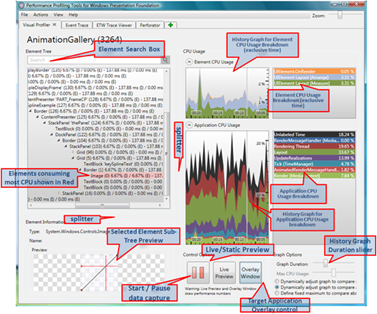
Finally, after a long time of silence, the new version of WPF Performance Profiling Tool is available for download for x32 and x64 OSs.  So, what’s new there?

Ton of UI improvements for Visual Profiler

image

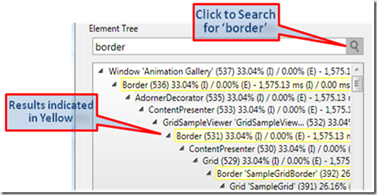
New search function to quick find elements in visual tree

image

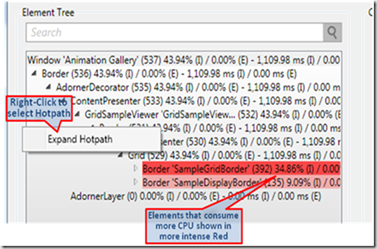
Hot path (critical path) of CPU usage aside with CPU usage for single element

image

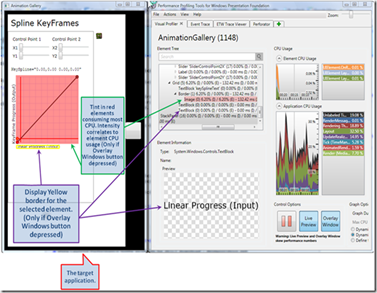
Configuration of tint for overlay windows

image

Live preview, ability to split columns, slider of graph duration, expanders to have cleaner screen and much much more

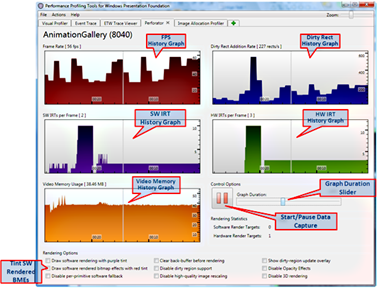
Perforator also got new UI and has history now.

image

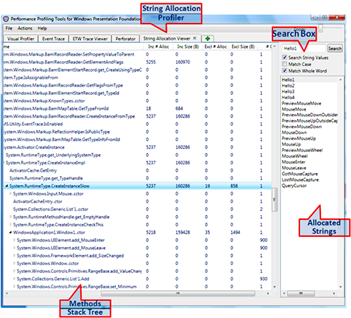
There is new tool, named String allocation profiler

image

This tool is very useful for viewing and managing strings inside your application (another step toward normal localization support for WPF? Probably)

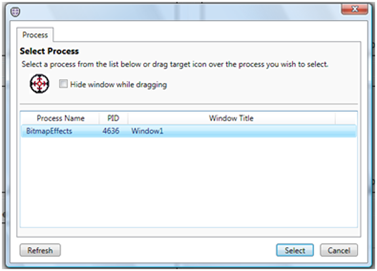
There are also some improvements in Event tracing tool. Select process for example :)

image

And much much more. Great thank to Josef and his team for this great work

Download the new version of WPF Performance Profiling Tool >>

Tuesday, September 09, 2008

Developers academy 3 - vote your choice

If you're "in" WPF and/or Silverlight development and want to learn more about high performance programming in WPF or your ability to develop once for WPF and Silverlight, you're invited to vote for my session in Dev Academy 3 and attend it:

  • High performance programming with WPF in .NET framework 3.5 SP1
    .NET 3.5 SP1 (Arrowhead) brings you full power of WPF by taking into account huge performance enhancements for Line-Of-Business by using data virtualization and high graphical applications by access to DirectX surfaces. This session will round up all new features to Arrowhead
  • Unified development experience with Windows Presentation Foundation and Silverlight 2.0
    Two years ago, Microsoft introduced Windows Presentation Foundation (WPF) to provide a unified platform for Rich Windows Client Applications development. A year later Silverlight was introduced as similar platform for Rich Internet Applications. Is it possible to use XAML based approach to share and reuse code for both frameworks? In this session we will learn how to develop reusable code base for productive, usable and well branded Client and Internet applications to wider distribution, demanded today.

Also, you can advice another session, you might be interested in via comments in this post

Thank you and see you there...

Tuesday, August 12, 2008

WPF DataGrid CTP is here. It’s also open source!

Huge amount of people asked me about DataGrid control in WPF. There are some 3rd parties providing this control for free and not, However, I always adviced them to wait until Microsoft will release it with (or after) Arrowhead. So here comes the King. Some boys and girls from MS WPF dev team have OS initiative and released WPF toolkit. It’s absolutely free and includes all sources. Also it renewed with WPF DataGrid CTP and other tasty Futures inside with full source aside.

Microsoft goes open source? It does!

image

Download latest WPF toolkit >>

Friday, August 08, 2008

Expert days – last minute changes

Next week we’ll starting Expert Days, so you have a last chance to register for Windows Presentation Foundation for fellow developers (12-Aug) and Mastering Microsoft Silverlight 2.0 (13-Aug). Those sessions will take place in Bein-Thumi Herzeliya and start in 8:30.

We have not enough participants to open Advanced .NET 3.5 SP1 (14-Aug) [not enough people know WPF so far in Israel?], thus I would like to propose another kind of session – something like we used to do in Dev Days. You’ll come with your WPF applications, prepare to ask questions about problems with those apps and we’ll solve it together during the day. I will not have slides for this session – it will be live QnA+Discussions meeting. This specific session will take place in Megamot college in Petah-Tikva (not in Bein-Thumi, like all others). What do you think?

Last notice, if we will not have at least 26 attendees (currently for this session we have only 10), neither Advanced .NET 3.5 nor WPF QnA will be opened. Also, all people registered for those sessions will be refunded. So, now you will choose whether and which session about WPF we will open Thursday next week.

Sunday, June 22, 2008

Mastering Images in WPF

If you are “in” WPF imaging, you, definitely, should read this post of Dwayne Need (who is SDM of WPF in Microsoft) about customizing BitmapSource. A ton of information about how to make Bitmap Source for your needs, what WIC is and how to use it. Also he has a lot of samples in CodePlex. Great work, Dwayane.

Tuesday, June 17, 2008

HLSL (Pixel shader) effects tutorial

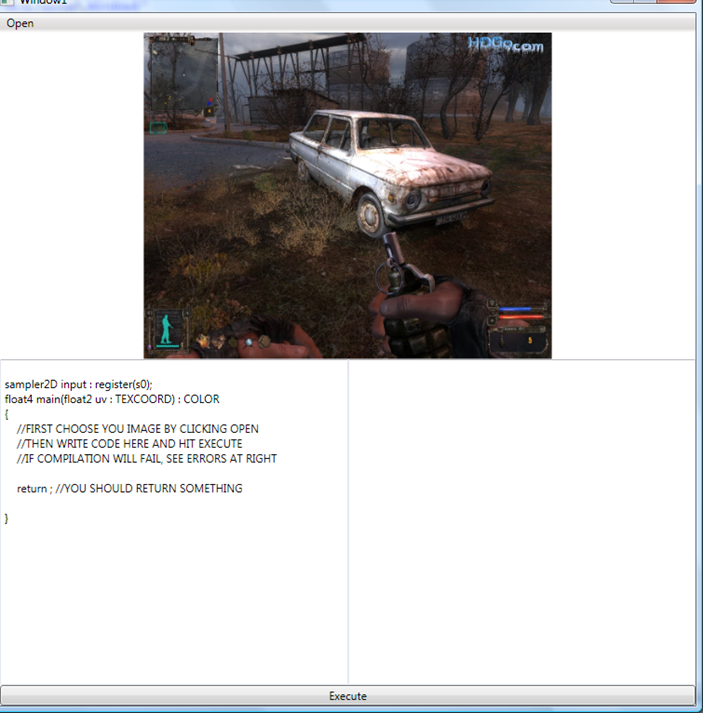
Recently, I already wrote about PixelShader effects, introduced in .NET framework 3.5 SP1 (WPF). However it looks like for most people this syntax is still hard to understand. Today we’ll try to lean it more. In order to do this, I wrote small program, that helps you to write and debug pixel shader effects quickly. This how it looks like

image

Hit Open to load image, Write your code and hit Execute to compile and apply bitmap dx effect to the image. Let’s start from very beginning. Effect, that does nothing:

sampler2D input : register(s0);
float4 main(float2 uv : TEXCOORD) : COLOR
{
    float4 Color;
    Color = tex2D( input , uv.xy);
    return Color;
}

This is the results:

image

What was done? We got pixel. Read it color and return it as it to the shader. Let’s do something more interesting.

Actually we can get float2 as coordinate, this means, that it can be spitted to uv.x and uv.y. Also color is float4 (argb), thus we can change color. Let’s multiply color by 3

Color = tex2D( input , uv.xy)*3;

And the result is bright image

image

We also can make operations with variables.

Color = tex2D( input , uv.xy)*uv.x;

Result

image

We not have to change whole color. We can also change only its part. Blue for example

Color = tex2D( input , uv.xy);
Color.b = Color.b*2;

Result

image

Or execute math operations

Color = tex2D( input , uv.xy);
Color.r = Color.r*sin(uv.x*100)*2;
Color.g = Color.g*cos(uv.x*150)*2;
Color.b = Color.b*sin(uv.x*50)*2;

Result

image

Color is not only thing we can operate. Actually we’re sampling coordinates, so operations done with coordinates should work. Let’s try to stretch image

uv.x = uv.x * 0.5;
Color = tex2D( input , uv.xy);

Result

image

Why 0.5? Should not it make it smaller? Actually not, you’re multiplying coordinates, so to make the image smaller, you should divide

uv.x = uv.x / 0.5;
Color = tex2D( input , uv.xy);

Result

image

Some math could be fun here also

uv.y = uv.y  + (sin(uv.y*100)*0.03);
Color = tex2D( input , uv.xy);

Result

image

There are a ton of interesting effects you can do by using pixel shaders. Here for example color shift

   Color = tex2D( input , uv);
Color.r -= tex2D( input , uv +(somevar/100)).r;
Color.g += tex2D( input , uv+ (somevar/200)).g;
Color.b -= tex2D( input , uv+ (somevar/300)).b;

Result:

image

Or, even cooler efects

Color -= tex2D(input , uv.xy-0.003)*2.7f;
Color += tex2D( input , uv.xy+0.003)*2.7f;
Color.rgb = (Color.r+Color.g+Color.b)/3.0f;

Result

image

You can also use cases and ifs for even cooler effects

Color.rgb = (Color.r+Color.g+Color.b)/3.0f;
if (Color.r<0.2 || Color.r>0.9) Color.r = 0; else Color.r = 1.0f;
if (Color.g<0.2 || Color.g>0.9) Color.g = 0; else Color.g = 1.0f;
if (Color.b<0.2 || Color.b>0.9) Color.b = 0; else Color.b = 1.0f;

Result

image

Other words, the sky is the limit.

Please note, that Pixel Shaders done in GPU only, thus it is the most efficient method to manipulate your images. Actually, you can apply effect to any UIElement, thus the sky is really the limit.

Have a nice day and be good people. Download code for this article. Notice, that you’ll need DirectX SDK to compile pixel shader files and use this program

Sunday, June 15, 2008

Silverlight controls library has been upgraded to Beta 2

Finally this weekend I got  a time to upgrade one of my OpenUp submissions, Silverlight controls library to work with Silverlight 2.0 beta 2. It was very interesting to track changes between developer’s (beta 1) and production (beta 2) go-live licenses. Let’s try to understand what has need changed.

  1. Syntax of DependencyProperty registration. Now instead of DependencyProperty.Register(name, propertyType,ownerType,propertyChangedCallback) you should use DependencyProperty.Register(name, propertyType,ownerType,typeMetadata), which, actually receives only one parameter in constructor – propertyChangedCallback. This make Silverlight to be closer to WPF syntax and open it for future enhancements. You can download updated Visual Studio 2008 snippet for creation of Silverlight Dependency Properties.
  2. OnApplyTemplate method of UserControl become public instead of protected
  3. Thumb DragDelta event argument is not DragEventArg anymore. Now it’s DragDeltaEventArgs. So there is no HorizontalOffset and VerticalOffset attributes. They replaced by HorizontalChange and VerticalChange
  4. DefaultStyleKey is not null anymore
  5. Most of controls migrated from System.Windows.Controls into System.Windows namespace
  6. Some changed to ToolTip service
  7. Now Silverlight checks whether TargetType property of Style is really compatible with the control, you’re applying style to (this not happened in beta 1). Also DependencyObject.SetValue() method checks it’s type.
  8. There is no InitializeFromXaml anymore. Now Silverlight works more “WPF style” with application services – Application.LoadComponent()
  9. You cannot use x:Name and Name property together (someone did it?)

There are a ton of other changed, that was not related to Silverlight Control Library. For example, changed within Storyboard class, networking, cross-domain policy, other controls (e.g. DataGrid), Templates of some controls (e.g. Button, TextBox, etc) and API.

Also I want to invite you to take part into development of Silverlight controls library not because of complimentary ticket to PDC ‘08 or Mobile Memory Mouse 8000, but because Open Source is not “one-men-show”. To get access to SVN, submit your work and begin development of next generation of Silverlight controls, contact me via CodePlex and I’ll add you to the project as new contributor.

Friday, June 13, 2008

Presenting at TechEd Developers South Africa 2008, Durban

Save the date. TechEd Developers South Africa is around the corner (August 3rd through 6th). This year it will take place in Durban, the third most populous city in South Africa.

image

This TechEd, there are four sessions assigned to me:

Creating Rich Applications with Windows Presentation Foundation (300)

Completely new session about how to enrich user experience, by decreasing development efforts with WPF. In order to do this, we’ll try to take some application and completely recreate it, by using XAML only without any single code line.

Target audience: Developers and decide makers, who what to understand what can be done with WPF and how easy you can do it.

Understanding Reflection (400)

This is also new session for lazy developers. It’s not only about what reflection is or what’s new about reflection in latest frameworks (including .NET 3.5 and Silverlight), but also how to use it to make developer’s life easier. We’ll enter a bit into IL to understand what’s going on under the hoods, but most of session is about appliance of this technology for everyday developers’ tasks and challenges.

Target audience: Developers, have an experience with .NET programming

WPF Performance (400)

Session very similar to one, I had in Dev Academy 2. However this time it will focus on performance enhancements in .NET framework 3.5 SP1. I’ll speak about virtualization, parallel processing, DX surface direct access and more…

Target audience: Developers, have an experience with WPF development.

Game Development Using Microsoft’s Latest Technologies (300)

Fun session, I had in TechEd Israel with very complicated setup. Here the sneak preview of how it looks like. It listed as a 300 level, because the fact, that except this session’s fun, you can learn a lot of new there.

Target audience: Everyone, who love technology and want to have fun hour in the morning before advanced sessions will begin.

If you’re reading my blog, and you’re going TechEd Africa. Come and say me hello, ‘cos it would be really nice to see the faces of the people I’m writing to in this blog :)

More information about other sessions in this TechEd can be found in Ahmed Salijee blog, who is developer evangelist in Microsoft Africa and arranges this event.

See you there.

Thursday, June 05, 2008

Quick note: New TechEd downloads

There is TechEd in Orlando, and this means, that there are a lot of new announcements. Let’s fill up our download managers with expensive fuel and start.

Silverlight 2.0 beta 2 + Microsoft Expression Blend 2.5 June preview will be available for download very soon. Keep watching. Meanwhile, you can start learn about new TabControl, VisualStateManager, new templating system and cross-domain policy from Tim Heuer’s blog. Also there are some news about event bubbling in beta 2 in Jesse’s blog.

Wednesday, June 04, 2008

Silverlight accessibility and CEO support for beta 2

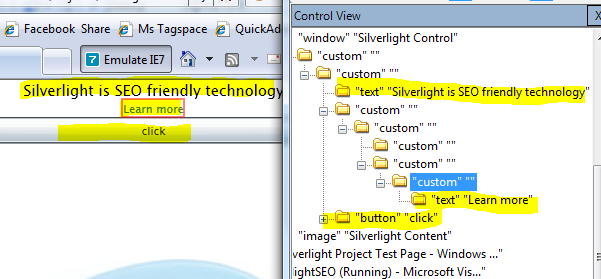
Yesterday, beta 2 of Silverlight was officially announced in TechEd Orlando. There are a lot of interesting changes. One of most significant changes, I want to notice and accessibility support in Silverlight. See yourself (if you do not know what this image about, see this post)

image

What should you do in order this to happen? Absolutely nothing. This is build in feature in Silverlight 2.0 b2. It’s not like WPF, where you should use Automation namespace boundary. This just works. You can read the Silverlight content with screen narrators. Great respect to dev team.

Why this CEO friendly? Come to my Silverlight half day session at July, 30 to learn why.

Regarding other features, there is new templating model in Silverlight, named VisualStateManager. It can save your time in controls development. Do you remember me speaking about State oriented programming in Silverlight, rather, then KeyFrames oriented programming in Flesh? That what is it.

if (SomethingHappened) {
VisualStateManager.GoToState(this, “SomeState”, true);
}

Also, there is TabControl, text wrapping and scrollbars for TextBox. Regarding DataGrid it become much faster and enhanced by Reordering, Autosize and Sort capabilities.

There are also some security enhancements for Cross-Domain networking and duplex communication. If you not sure about what is it, see this and this post.

Also now you can work with LINQ-to-JSON, ASO.NET DS and SOAP-based data sources.

In additional, there is new XML-based format for DeepZoom MultiScaleTileSource and MultiScaleImage controls.

Have a nice day and be good people.

Monday, June 02, 2008

Just released: Parallel Extensions – June CTP

Today, Parallel Programming team released 2nd CTP for Parallel Extensions to .NET Framework 3.5. Major features in this CTP are declarative parallelist (LINQ-to-Object, LINQ-to-XML), parallel tasks and imperative data and, the most important (for me) – user mode work stealing scheduler. It makes very efficient use of parallel hardware. Additional information regarding this release can be found in team blog. Also, please, report bugs to Connect in order to help those guys to produce better product.

Download June CTP of Parallel Extensions to .NET 3.5 >>

Friday, May 23, 2008

Brightness and contrast manipulation in WPF 3.5 SP1

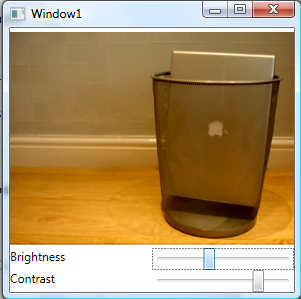
While being in flight, I had to learn new features, introduced in .NET 3.5 SP1. So, let’s start from image manipulation. I want to perform contrast and brightness manipulation in GPU over displayed image. In order to begin, you should download and install .NET 3.5 SP1 and Visual Studio 2008 SP1. Meanwhile (it’s about 500 MB of download) we’ll learn how to write custom shader effect.

image

In order to build custom Shader Effer, we have to use HLSL (High Level Shading Language). This is programming language, introduces in DirectX 9.0 and supports the shader construction with C-like syntax, types, expressions and functions. If you know C – it will be very easy for you to learn it.

What is shader? Shader is consists of vertex shader and pixel shader. Any 3D model flows from application to the vertex shader, then pixel shader frames buffer. So we’ll try from simple matrix transformation. First we should build the struct of the position. It is float4 type and has POSITION inheritance. Also we have to get matrix, which is regular float4x4 object. Then all we have to to is to translate inpos by matrix and return new position. That’s exactly what following code does.

float4 main(float4 inpos : POSITION, uniform float4x4 ModelViewMatrix) : POSITION
  {
     return mul(inpos, ModelViewMatrix);
  }

So by using HLSL we can play freely with vertexes, but what’s happen with pixel shader? This works exactly the same way. We have pixel, which is TEXCOORD in input and COLOR in output. So, here it comes

float4 main(float2 uv : TEXCOORD, float brightness, float contrast) : COLOR
{
    float4 color = tex2D(input, uv); 
    return (color + brightness) * (1.0+contrast)/1.0;
}

For more information about HLSL, please visit MSDN. As for us, we already have our shader effect and how we have to compile it into executable filter. In order to do it, we’ll use directx shader effect compiler. Let’s say, that we have our source in effect.txt file and our output file will be effect.ps. Small tip insert following line into pre-build event, and have your shader effect script ready and up-to-day with each compilation.

fxc /T ps_2_0 /E main /Fo"$(ProjectDir)effect.ps" "$(ProjectDir)effect.txt"

Mode information about FX compiler command switches, can be found here. How we should actually wrap our effect in manage code. But wait. We have to pass parameters into shader effect. How to register external parameters within FX file? Simple. Exactly as input params. Note, the tag inside register method will actually be used within our managed wrapper.
sampler2D input : register(s0);
float brightness : register(c0);
float contrast : register(c1);

float4 main(float2 uv : TEXCOORD) : COLOR
{
    float4 color = tex2D(input, uv);
    float4 result = color;
    result = color + brightness;
    result = result * (1.0+contrast)/1.0;
    return result;
}

Well done.  Let’s build wrapper. Of cause you should inherit from ShaderEffect object and register your input param

public class BrightContrastEffect : ShaderEffect
    {
…

public Brush Input
        {
            get { return (Brush)GetValue(InputProperty); }
            set { SetValue(InputProperty, value); }
        }

        public static readonly DependencyProperty InputProperty = ShaderEffect.RegisterPixelShaderSamplerProperty("Input", typeof(BrightContrastEffect), 0);

Then load pixel shader from application resources (you should compile ps file as “Resource”)

private static PixelShader m_shader = new PixelShader() { UriSource = new Uri(@"pack://application:,,,/CustomPixelRender;component/bricon.ps") };

Then parameters (they are regular dependency objects) with additional special PixelShaderConstantCallback, that received the numeric id of registered properties from pixel shader effect.

public float Brightness
        {
            get { return (float)GetValue(BrightnessProperty); }
            set { SetValue(BrightnessProperty, value); }
        }

        public static readonly DependencyProperty BrightnessProperty = DependencyProperty.Register("Brightness", typeof(double), typeof(BrightContrastEffect), new UIPropertyMetadata(0.0, PixelShaderConstantCallback(0)));

        public float Contrast
        {
            get { return (float)GetValue(ContrastProperty); }
            set { SetValue(ContrastProperty, value); }
        }

A couple of updates and we done with code behind.

public BrightContrastEffect()
        {
            PixelShader = m_shader;
            UpdateShaderValue(InputProperty);
            UpdateShaderValue(BrightnessProperty);
            UpdateShaderValue(ContrastProperty);

        }

Next step is XAML. Each UI element in .NET 3.5 SP1 got new property, named Effect, that designed to hold your custom shader effects (exactly as it was with transformations in 3.0 and 3.5). I want to perform a transformation over image.

<Image Source="img.jpg">
           <Image.Effect>
               <l:BrightContrastEffect

Now we should build two sliders to manage brightness and contrast level

<UniformGrid Grid.Row="1">
           <TextBlock Text="Brightness"/>
           <Slider Maximum="1" Minimum="-1" Name="bVal"/>
           <TextBlock Text="Contrast"/>
           <Slider Maximum="1" Minimum="-1" Name="cVal"/>
       </UniformGrid>

And bind to its values from our pixel shader effect

<Image Source="img.jpg">
            <Image.Effect>
                <l:BrightContrastEffect
                    Brightness="{Binding ElementName=bVal, Path=Value}"
                    Contrast="{Binding ElementName=cVal, Path=Value}"/>
            </Image.Effect>
        </Image>

That’s all, folks. Please note, that everything, done with shader effects, done in GPU. Also, the effect applies on rendered object (you can set the same effect not only to image, but to any UIElement in your system. Thus from performance point of view it’s the best method to work with your output. Let’s take for example very big image (3000x3000 pixels), rendered with low quality to 300x300 size. Perform per-pixel transformation (what we done here) will take 300X300Xdpi loops. While if you’ll perform the same operating over source image or memory section, used to create it, you’ll have to do 3000x3000xdpi loops, which is x10^2 more times.

Have a nice day and be good people.

Source code for this article.

Thursday, May 22, 2008

Action required: Smart client users group

Recently I browsed INETA to seek for some group and was really surprising. There is no Smart Client user group registered there. Maybe there is a reason? Let’s understand what Smart Client is?

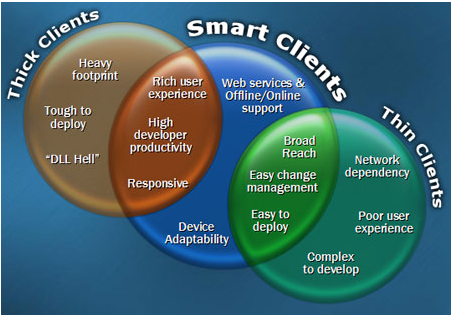
According wikipedia, the term "Smart Client" is meant to refer to simultaneously capturing the benefits of a "thin client" (zero-install, auto-update) and a "fat client" (high performance, high productivity). However, I think, that this term is much wider. It is not only thin-fat client application, it’s also most of applications we’re using today.

image

Thick Client

We always want to provide our users with best experience and increase their performance. However we are (as developers) want to avoid complicated development and deployment. This why we should know as much as possible about user’s system, when users do not want to have real footprint in their systems. That’s dilemma. Is it possible to solve it? Let’s look deeper…

Are we really need installation? Most of old software installations put things in registry. It because you were never sure what client has in his system and were our application can put files or temporary data. Today, when we have local application or user isolated storage, so we not really need to use registry. Maybe only for our own ego – this is cool to have something like “HKLM/Software/MYNAME” in 1,000,000 user’s computers…

No installation is good, but what to me with maintenance. We want our system connected…

Thin Client

Could you imagine your user to visit product site twice a week to see what’s going on? I can not. However I know, that if I’ll ask him first about automatic updates and he’ll agree to forget about application maintenance, his experience will be much better.

So,we are connected. What now? I want to make time reporting system. Web service? Maybe some kind of distributed application. Maybe, even Twitter? This way we can be sure, that our data is safe and if user reinstall whole system, he do not really need to care about backups.

But users not always have internet access. Sometimes they are offline. How to solve the problem of occasionally connected users? I do not want him every lunch want for two minutes, until I realize, that there is no internet connection and will not even give him a chance to use the application?

image

So, we also want our system to be useful offline. But what’s up with Web 10.0? We want millions. We want very broad reach for our application. Also we want to be able to manage application updates remotely?

Let’s take a look into other pan of application development. Do you like JavaScript? I do not! I think it’s too complicated to develop things for web. We should invest into at least 50% of coverage and integration tests, while giving customers pretty poor user experience. What is we want to provide the same look and feel everywhere? In web, desktop, mobile and other devices? Our customers want the application everywhere?

Summery

This is exactly what Smart client designed for. Technologies such as .NET, WPF, Silverlight from Microsoft, Flex, Thermo from Adobe and others tries to make you to be there with your application. But how to do it? How to answer all those hard questions, I asked?

I want to announce new (currently virtual) user group, dedicated to Smart Client development. I do not want to restrict this group geographically, due to fact, that current infrastructures allows us to forget about distances and be together. Join today “Smart Client development” user group.

In order to join, just send me an email to tamir [at] khason.biz with information about you. I put the request to create this user group in INETA. Once it will be opened, I’ll send everyone email to register and connect them selves to this group.

Be in touch.